• About
  • Advertise
  • Privacy Policy
  • Contact
Android Kenya
  • Home
  • News
  • Apps
  • Gadgets
  • Reviews
  • Deals
  • How To
  • Knowledge Base
No Result
View All Result
  • Home
  • News
  • Apps
  • Gadgets
  • Reviews
  • Deals
  • How To
  • Knowledge Base
No Result
View All Result
Android Kenya
No Result
View All Result
Home News

Voice input, remote control buttons come to the Chromecast menu on YouTube’s Android app

Emmanuel Chenze by Emmanuel Chenze
December 21, 2019
in News
0
Safaricom makes free YouTube data bundle a permanent offering, cuts it down to 2GB
FacebookTwitterWhatsApp

If your plans this holiday season involve not moving far away from your couch as you catch up on all the videos from your favourite YouTube creators and channels that you may have missed during the years then Google just turned on what may perhaps be the best Christmas cheer for you.

A new change has shown up on my phone over the last 24 hours as I used various television sets to cast content from my phone to them.

The YouTube team is rolling out an interesting change that brings the best of both worlds of some of the best services and features in the Google ecosystem: YouTube and Chromecast.

You see, what usually happens when you cast content from your phone to a connected TV is that you usually get a soft control menu on the casting device that can control whatever is being cast without the need to engage another device, like the TV’s own remote control. In fact, on Android TV devices, that is usually the best way to go around it as using the TV or streaming box’s own remote control is limited to just two functions: pause and play.

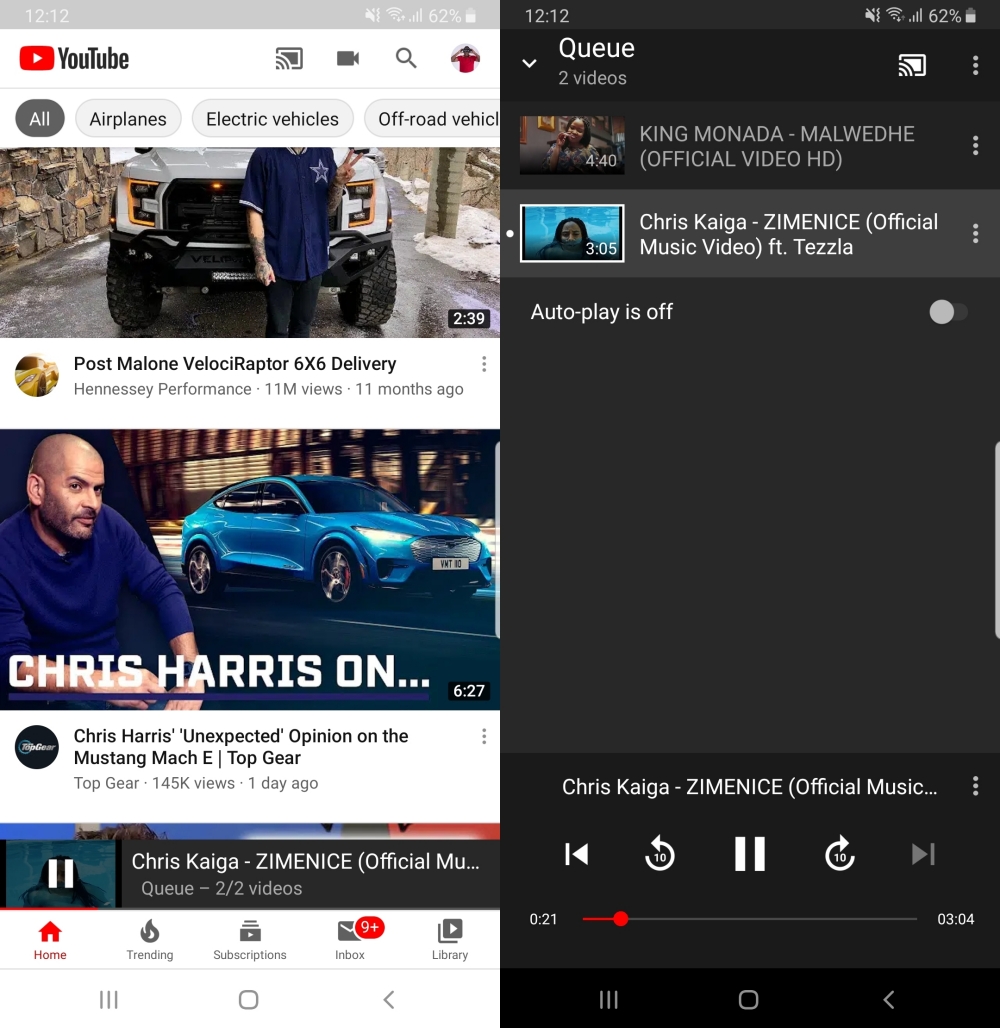
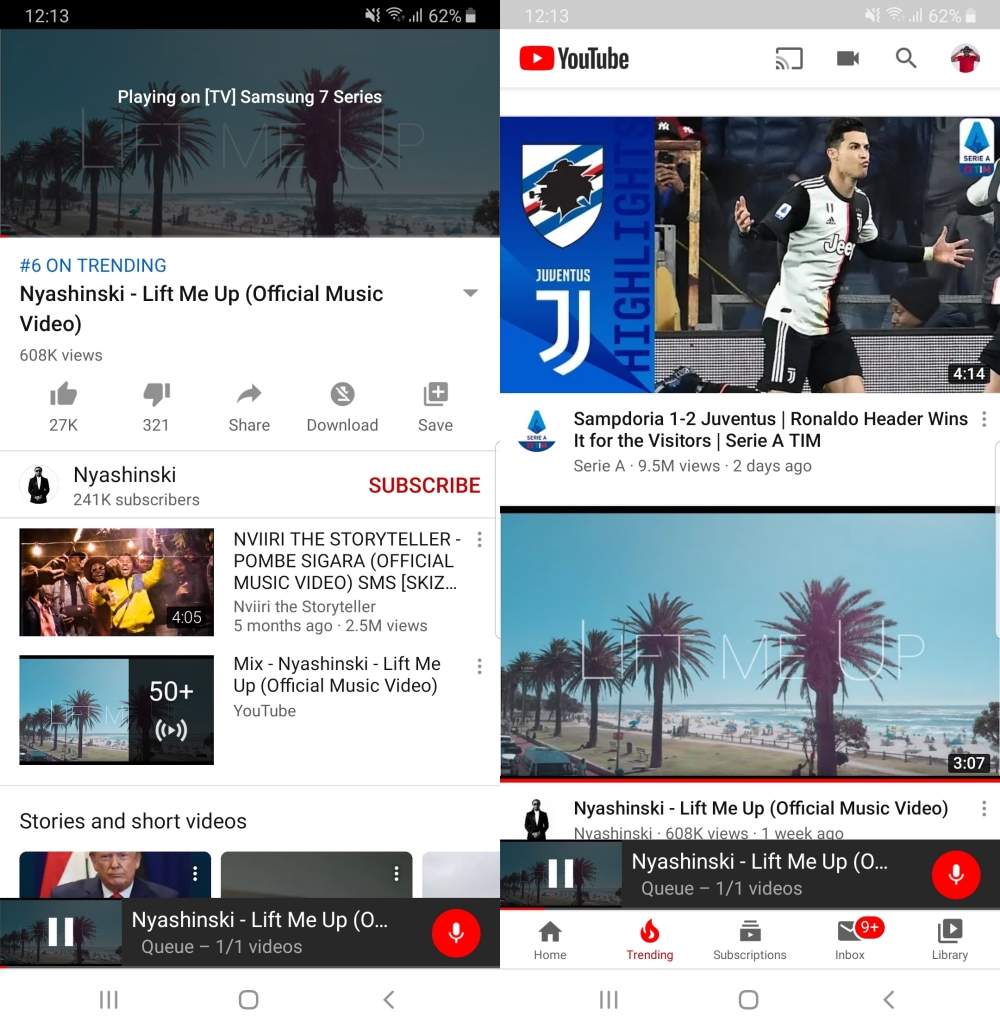
In the new arrangement, which is rolling out as an update on both the TV side of things as well as the phones, users now get a more fully-featured remote control option that allows them not just control over what’s currently playing on TV but also access to other things like the recommended videos by using the navigation keys that are now available on the mobile YouTube app whenever one is casting video content to a compatible device (TV or streaming box).

New features unavailable
New features enabled
In addition to the new virtual remote, users can also decide to ditch it and use yet another feature: voice control. This is especially ideal to those that have normalized barking into their Google Assistant-enabled remote controllers or any other smart devices with the Assistant that they may have set up.

READ:  Android 10 finally comes to Android TV

In my testing, version 2.1.491 of the YouTube app on Samsung smart TVs, which rolled out only yesterday (December 20th), is what is needed in order to complement the new features which come with version 14.50.53 of the mobile. Recent updates on other TVs and TV platforms should also be able to yield the same results as mine.

I was not able to get the new features on my NVIDIA Shield as the YouTube for Android TV app running on it is still stuck at version 2.08.10.

Join our Telegram channel
Previous Post

EMUI 10 now running on 10 million Huawei and Honor devices

Next Post

The Android apps we lost in 2019

Related Posts

YouTube Just Dropped Its Own ‘Wrapped’ For Videos
News

YouTube Just Dropped Its Own ‘Wrapped’ For Videos

December 2, 2025
YouTube-Premium-Lite-2
News

A cheaper YouTube Premium ‘Lite’ plan is launching soon

February 24, 2025
Google-TV-Streamer-and-remote
Gadgets

Chromecast with Google TV gets June patch ahead of Google TV Streamer launch

September 19, 2024
Next Post
The Android apps we lost in 2019

The Android apps we lost in 2019

Leave a Reply Cancel reply

Your email address will not be published. Required fields are marked *

Subscribe to our newsletter

  • Trending
  • Comments
  • Latest
Kenya-Power

Kenya Power’s MyPower app gets a major upgrade

January 16, 2025

Oppo A60 review: Rugged darling

June 10, 2024
Tecno Spark 3 Pro-10

How to fix OTG connected pop-up error on Tecno phones

July 28, 2019
Oppo Reno8 T review: High praise

Oppo Reno8 T review: High praise

February 28, 2023
BREAKING: Samsung Announces Galaxy S26 Series

Samsung Adds AirDrop Support to Select Galaxy Devices

0
Nothing Phone 4a Pro

Nothing Phone 4a Pro Breaks Cover With Its Most Striking Design Yet

0
WhatsApp Working on Premium Subscription Plan Called WhatsApp Plus

WhatsApp Working on Premium Subscription Plan Called WhatsApp Plus

0
Google Slashes Play Store Fees and Makes Sideloading Easier in Major Android Overhaul

Google Slashes Play Store Fees and Makes Sideloading Easier in Major Android Overhaul

0
BREAKING: Samsung Announces Galaxy S26 Series

Samsung Adds AirDrop Support to Select Galaxy Devices

March 23, 2026
Nothing Phone 4a Pro

Nothing Phone 4a Pro Breaks Cover With Its Most Striking Design Yet

March 5, 2026
WhatsApp Working on Premium Subscription Plan Called WhatsApp Plus

WhatsApp Working on Premium Subscription Plan Called WhatsApp Plus

March 5, 2026
Google Slashes Play Store Fees and Makes Sideloading Easier in Major Android Overhaul

Google Slashes Play Store Fees and Makes Sideloading Easier in Major Android Overhaul

March 5, 2026
  • About
  • Advertise
  • Privacy Policy
  • Contact

© 2025 Android Kenya

No Result
View All Result

© 2025 Android Kenya


Loading Comments...