Cellulant’s Mula application is one of the must-have apps for Kenyans even though the app’s download numbers on the Google Play Store don’t reflect this. It deserves way more users so if you are reading this and haven’t, yet, discovered how good that app is, take it from me and head over to the Play Store. Of course, you can uninstall it and forget this ever happened if it turns out that it doesn’t meet your expectations in any way.
For those not in the know, Mula is a bill payment application. Through it, one can settle utility bills as well as buy airtime. Personally, the one reason why it is my personal favourite is because it allows me to buy airtime for my Airtel and Telkom lines from Safaricom’s M-Pesa, my preferred mobile money platform, without having to endure the long waiting times that users of Pesapal have to endure before things are reflected (up to half an hour as of the last time I tried it out) which beats the purpose of having an online platform at your beck and call in the first place. There’s also the bit where I find it reliable. I’ve never had to go through the stress of contacting Kenya Power’s terrible customer support teams over tokens that I have purchased and not received, a common occurrence for those who use other online platforms for similar purposes (just check social media).
Thanks to being the handy app that it is and me being the loyal user that I am, I am obviously bound to notice even the tiniest of details when they are made in any update to the app. The latest, version 2.5.14, brings a radical overhaul to the Mula interface as we have known it for most of the last one year.
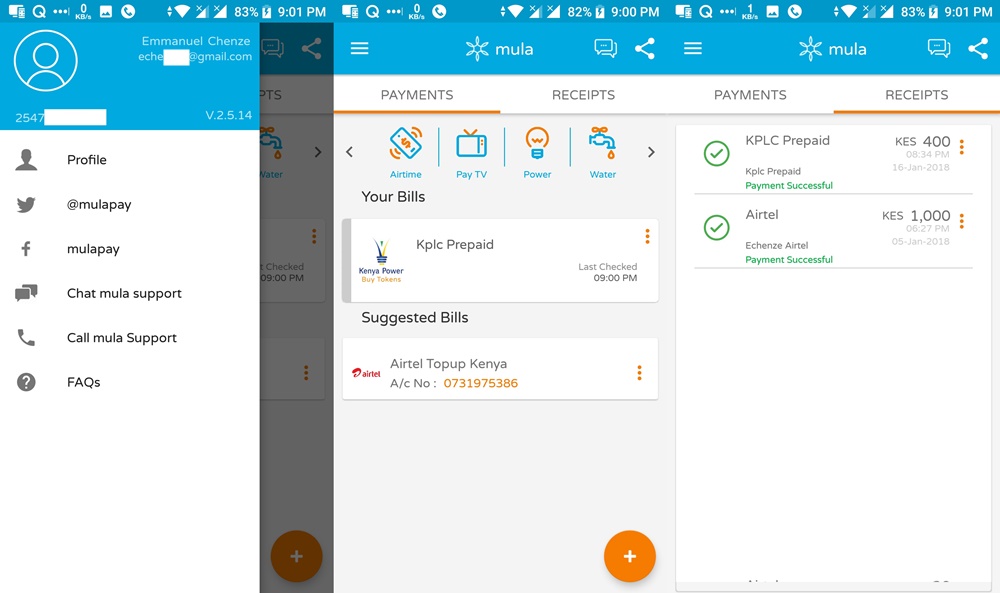
The landing page of the app now features a quick glance at past transactions as well as a call to action on a past bill paid that, as per what it’s deduced, is up for payment again. This is a stark contrast to the landing page of the previous version of the app which would simply list the last transaction made and offer users the ability to redo it without having to go to the “History” tab. The floating action button is retained in the latest update. However, unlike in the previous version, the floating action button’s tasks have been reduced to just proceeding to make bill payments. Previously, one was also offered an option to view their bill accounts. What I used to find interesting here is that the app would read one’s past M-Pesa transaction messages to come up with a list of bill accounts in addition to those logged in the app thanks to previous use. For the former accounts, users had to confirm them, though, before they could be used to pay bills. Of course, there was also an option to add new bill accounts.
As one will quickly notice upon installing the latest update of the app, the bottom tab strip is gone and in its place are two tabs at the top of the app for payments and receipts. Under “Payments”, users can choose the type of transaction they want to make: buy airtime, pay a water bill, internet bill etc. Simple. The “History” tab has been renamed to “Receipts” and given a little facelift. The very conspicuous “Delete” icon, “Buy Again” tab and status notification (which when clicked would result in the actual e-receipt being displayed) have all been bundled together under a three-button menu next to each transaction log. Decluttering the interface.
This update to the Mula app comes just over a month after Safaricom updated its mobile app, mySafaricom, to include bill payments, the mainstay of apps like Mula, as well as other features.