• About
  • Advertise
  • Privacy Policy
  • Contact
Android Kenya
  • Home
  • News
  • Apps
  • Gadgets
  • Reviews
  • Deals
  • How To
  • Knowledge Base
No Result
View All Result
  • Home
  • News
  • Apps
  • Gadgets
  • Reviews
  • Deals
  • How To
  • Knowledge Base
No Result
View All Result
Android Kenya
No Result
View All Result
Home How To

Google Assistant is now rolling out to everyone* – here’s how to get it right now

Emmanuel Chenze by Emmanuel Chenze
March 8, 2017
in How To
0
Google Assistant starts rolling out to compatible Android smartphones
FacebookTwitterWhatsApp

So, that day finally came. To some people, it came way early (and they couldn’t shut up about it) because they just woke up on the right side of bed or magic happened. Whatever.

To others, like me, that day wasn’t going to come anytime sooner as I was to find out. I got a phone call from the most unlikely of people to have received Google Assistant ahead of me.

I set out to find why. This is why: my Google Play services and Google apps were not up to date. Also, being the stickler to good grammar that I am, my language settings both on PC and on phone are always set to English UK aka “the real English”. Spare me the drama. For the purposes of keeping up with everyone, I’ve had to swallow my pride and go the English US way.

If you’re like me and haven’t received Google Assistant, yet, here’s a quick checklist to help you stay up to date:

  1. Is your smartphone running Android 6.0 (Marshmallow) or Android 7.x (Nougat)? If yes, proceed to step 2. Else, abort mission, go cry in a corner and pray to the gods of Android wherever your device comes from to have mercy on you.
  2. Is your language set to English (US)? It should. If it’s not, that isn’t hard. Open your settings app, go to Language & input then click on Language and make sure your language is English (United States) (this may vary depending on the device you have).
  3. Do you have the latest Google Play services installed? You can think of Google Play services as a framework. One that Google uses to uniformly update all the core apps and services on Android smartphones that are Google-certified without having to make users wait until the next firmware update. As such, this needs to be up to date for Assistant to grace your device. If your Google Play services is not version 10.5 then you better be checking out APKMirror right now. I was on version 10.2!
  4. Is your Google app up to date? You need to be on version 6.14. I was on v6.13. APKMirror, as always, came through for me. It will for you too.
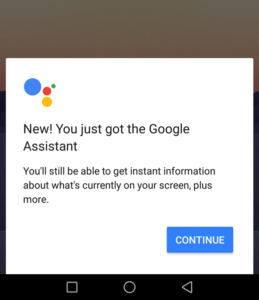
  5. Did you pray this morning? If you didn’t then this magic may not work 🙂 because the moment you have done everything as outlined in steps 1 through to 4 then you should be able to see this (see below) welcome sign the moment you long press your physical/on-screen home button (or whichever way you have set your device to access Google Now).
READ:  How to download content for offline viewing on Showmax

Bonus step: uninstall Google Allo. For real, the only reason some of us still had that app lying around was because of Assistant. Now that we have it, we may have to take a second look into that relationship.
Join our Telegram channel
Previous Post

Wileyfox reveals Android Nougat upgrade roadmap for its devices

Next Post

Two Google Assistant alternatives worth trying on your Android smartphone

Related Posts

Google testing Ask YouTube
News

Google Testing a New Way of Finding Videos on YouTube

April 28, 2026
Google Slashes Play Store Fees and Makes Sideloading Easier in Major Android Overhaul
Apps

Google Slashes Play Store Fees and Makes Sideloading Easier in Major Android Overhaul

March 5, 2026
Android Users Can AirDrop to iOS, But There’s a Sneaky Catch
News

Google Confirms When AirDrop Hack for Android Will Expand Beyond Pixel Devices

February 8, 2026
Next Post
Two Google Assistant alternatives worth trying on your Android smartphone

Two Google Assistant alternatives worth trying on your Android smartphone

Subscribe to our newsletter

  • Trending
  • Comments
  • Latest
Samsung Remains the Only Android OEM in Q3 2025’s Top-Selling Phones

Samsung Pushes Update to Midrange and Budget Galaxies

April 28, 2026
WhatsApp Working on Premium Subscription Plan Called WhatsApp Plus

WhatsApp Working on Repositioning Channels Within The App

May 1, 2026
Tecno Spark 3 Pro-10

How to fix OTG connected pop-up error on Tecno phones

July 28, 2019
Google testing Ask YouTube

Google Testing a New Way of Finding Videos on YouTube

April 28, 2026
Apple Leaves Android Brands Playing Catch-Up in New Report

Apple Leaves Android Brands Playing Catch-Up in New Report

0
WhatsApp Working on Premium Subscription Plan Called WhatsApp Plus

WhatsApp Working on Repositioning Channels Within The App

0
Google testing Ask YouTube

Google Testing a New Way of Finding Videos on YouTube

0
Samsung Remains the Only Android OEM in Q3 2025’s Top-Selling Phones

Samsung Pushes Update to Midrange and Budget Galaxies

0
Apple Leaves Android Brands Playing Catch-Up in New Report

Apple Leaves Android Brands Playing Catch-Up in New Report

May 5, 2026
WhatsApp Working on Premium Subscription Plan Called WhatsApp Plus

WhatsApp Working on Repositioning Channels Within The App

May 1, 2026
Google testing Ask YouTube

Google Testing a New Way of Finding Videos on YouTube

April 28, 2026
Samsung Remains the Only Android OEM in Q3 2025’s Top-Selling Phones

Samsung Pushes Update to Midrange and Budget Galaxies

April 28, 2026
  • About
  • Advertise
  • Privacy Policy
  • Contact

© 2025 Android Kenya

No Result
View All Result

© 2025 Android Kenya


Loading Comments...