• About
  • Advertise
  • Privacy Policy
  • Contact
Android Kenya
  • Home
  • News
  • Apps
  • Gadgets
  • Reviews
  • Deals
  • How To
  • Knowledge Base
No Result
View All Result
  • Home
  • News
  • Apps
  • Gadgets
  • Reviews
  • Deals
  • How To
  • Knowledge Base
No Result
View All Result
Android Kenya
No Result
View All Result
Home Apps

Google Play Store finally looks right after latest update

Emmanuel Chenze by Emmanuel Chenze
April 20, 2017
in Apps, News
0
Google Play Store finally looks right after latest update

cof

FacebookTwitterWhatsApp

The Google Play Store isn’t broken. If it was, we wouldn’t be hanging around. However, it seems to get better and better after each and every update it receives.

The latest update, for instance, changes the way things look and feel.

From this:
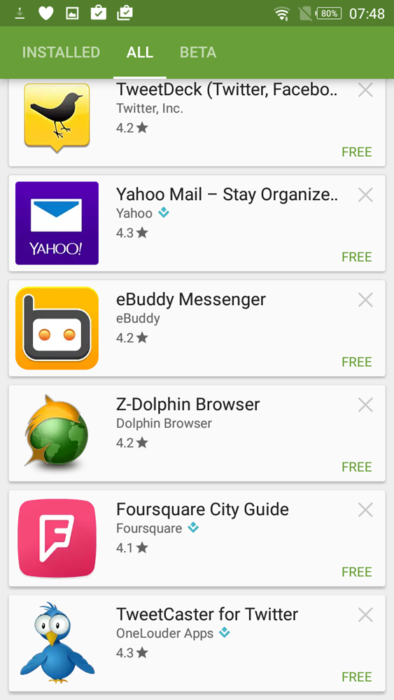
Play Store update


To this:


Good, isn’t it?

As you can see, previously, all app updates used to be available under the “Installed” tab. Now? They have their own tab called, you guessed it right, “Updates”. Users also get to view detailed information on the apps they about to update. Like when they last updated the app. The best, bit, in my opinion, is letting users know, beforehand, how big an app update is. Previously, this information was buried deep in the app description page. Handy for all the Kenyans who are up in arms over the disappearing acts performed by their data bundles.

READ:  Google Play is now 5 years old

Under the “Installed” tab users now get to do a little tinkering with filters which is very welcome: sort apps by either the last time they used them, the last time they updated them, alphabetically or by how big they are! It’s funny no one is calling Google out for encouraging fat app shaming. I, for one, love seeing which apps are bulky.


There is even more magic: the new “Library” makes downloading and installing or deleting apps that you have previously installed a breeze.

How do you get the new Play Store with these updates?

It’s a server-side update so you don’t really need to do a thing, it will just show up. Like magic. Mine did this morning after a few days of reading about it elsewhere and having everyone but me in the office getting it.

However, if it hasn’t shown up for you, yet, and you are running low on that reserve energy they taught us in Sunday School called patience then you can go to the settings app and clear the Play Store’s app data and cache. This should do the trick, at the very least though, nothing is guaranteed.
Join our Telegram channel
Previous Post

Google’s app for scanning printed photos has digitized almost 50 million snaps

Next Post

2017 IFA Global Press Conference gets underway in Portugal

Related Posts

Google Pixel 10a Leak Indicates No Real Upgrades Coming
News

Google Pixel 10a Leak Indicates No Real Upgrades Coming

December 10, 2025
Android-15
Apps

Google is making it harder to install Android apps outside the Play Store

September 19, 2024
Google-One-price-in-Kenya
News

There’s a new Google One ‘Lite’ plan for 30GB storage at Kshs 90 per month

September 19, 2024
Next Post
2017 IFA Global Press Conference gets underway in Portugal

2017 IFA Global Press Conference gets underway in Portugal

Subscribe to our newsletter

  • Trending
  • Comments
  • Latest
XAI-Grok

Trend of Grok users digitally undressing women on X sparks backlash

May 5, 2025

Oppo A60 review: Rugged darling

June 10, 2024
Oppo Reno8 T review: High praise

Oppo Reno8 T review: High praise

February 28, 2023
Kenya-Power

Kenya Power’s MyPower app gets a major upgrade

January 16, 2025
How to Check Your 2025 KCSE Results: Step-by-Step Guide and SMS Option

How to Check Your 2025 KCSE Results: Step-by-Step Guide and SMS Option

0
OnePlus Launches Turbo Series With Huge 9,000mAh Batteries

OnePlus Launches Turbo Series With Huge 9,000mAh Batteries

0
Google Play’s Best Apps of 2025: Full List of Winners

Google Play’s Best Apps of 2025: Full List of Winners

0
Google Pixel 10a Leak Indicates No Real Upgrades Coming

Google Pixel 10a Leak Indicates No Real Upgrades Coming

0
How to Check Your 2025 KCSE Results: Step-by-Step Guide and SMS Option

How to Check Your 2025 KCSE Results: Step-by-Step Guide and SMS Option

January 9, 2026
OnePlus Launches Turbo Series With Huge 9,000mAh Batteries

OnePlus Launches Turbo Series With Huge 9,000mAh Batteries

January 8, 2026
Google Play’s Best Apps of 2025: Full List of Winners

Google Play’s Best Apps of 2025: Full List of Winners

December 15, 2025
Google Pixel 10a Leak Indicates No Real Upgrades Coming

Google Pixel 10a Leak Indicates No Real Upgrades Coming

December 10, 2025
  • About
  • Advertise
  • Privacy Policy
  • Contact

© 2025 Android Kenya

No Result
View All Result

© 2025 Android Kenya


Loading Comments...