• About
  • Advertise
  • Privacy Policy
  • Contact
Android Kenya
  • Home
  • News
  • Apps
  • Gadgets
  • Reviews
  • Deals
  • How To
  • Knowledge Base
No Result
View All Result
  • Home
  • News
  • Apps
  • Gadgets
  • Reviews
  • Deals
  • How To
  • Knowledge Base
No Result
View All Result
Android Kenya
No Result
View All Result
Home News

Safaricom app now lets users reverse M-Pesa transactions

Hillary Keverenge by Hillary Keverenge
February 19, 2019
in News
0
The mySafaricom app now has a beta testing program, here’s how to join
FacebookTwitterWhatsApp

There is a new update to the mySafaricom app rolling out right now as version 1.4.0.8. As per the changelog provided by the telco, the update brings one very important feature – the ability to reverse send money M-Pesa transactions right from within the app.

Sending money to the wrong number is something that hasn’t happened to me ever. Not even before the Safaricom app came in. With the app, you can see details of the recipient and even the charges involved in sending the money before you hit the Send button. But still, for some reason, some people end up sending money to the wrong number.

READ:  Huawei Y7 Prime 2019: 3 features you'll like

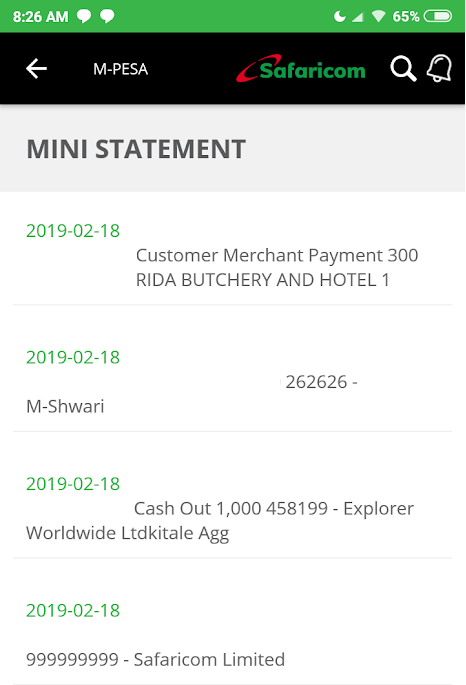
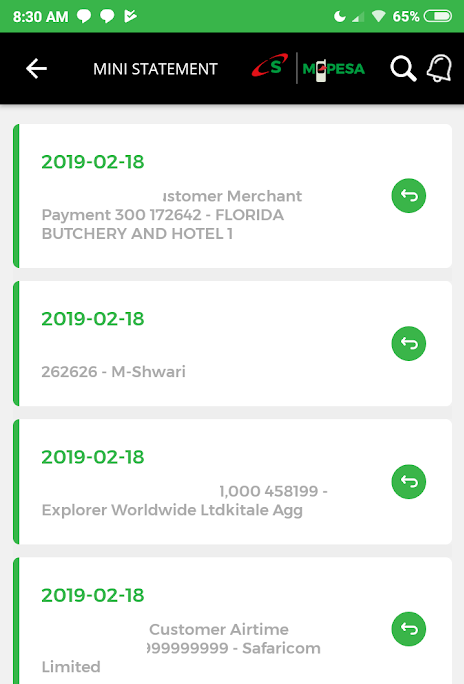
With this feature, Safaricom wants you to have a hassle-free way of requesting for the M-Pesa reversal service right from within the app. To do this, launch the app and go to M-PESA > M-PESA statement > Mini Statement and tap on the reversal icon that appears against each transaction in the list. See below screenshots of before (left) and after the update (right).
Safaricom app update Feb 2019 - before
Before
After

Once you hit the reversal icon, Safaricom will ask for a confirmation from you in order to initiate the reversal, but of course, we don’t know the caveats involved. For instance, can the feature still be effective hours or even days after the transaction? How long is the wait?
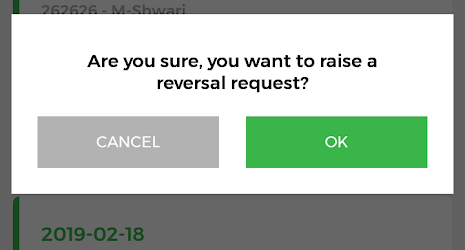
Safaricom app update Feb 2019 prompt

Although I didn’t try to reverse any transaction for obvious reasons, I can still see the icon against transactions that are a few days old. Interestingly, the icon is also visible on Lipa na M-Pesa transactions and even those for buying airtime and transferring money between M-Pesa and Mshwari, but why would one want to reverse a transaction they did between M-Pesa and Mshwari?

READ:  Huawei Y7 Prime 2019 starts selling at Safaricom shops

Besides the new send money reversal request, the update to version 1.4.0.8 also improves the prepaid usage statement under the Check Balance option, where you can now see your last ten transactions and the charges incurred in the process.
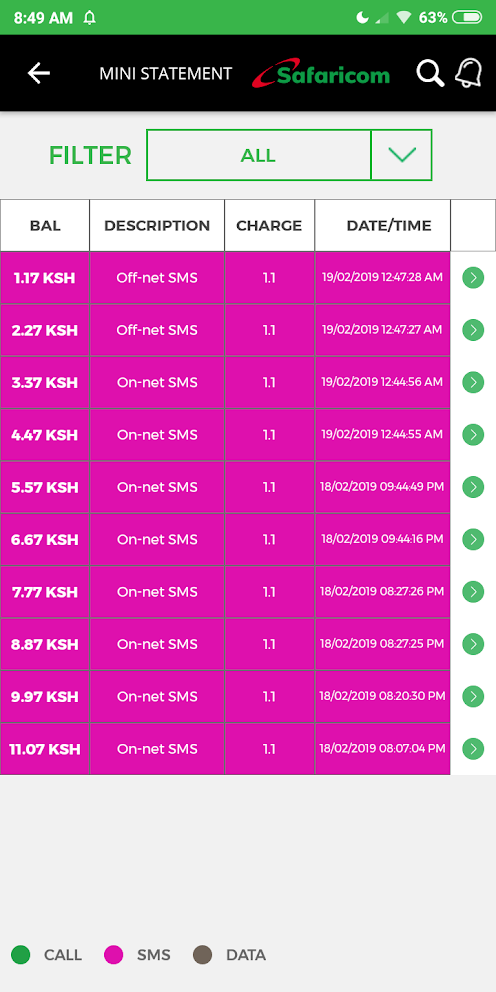
Safaricom app update Feb 2019

Also, it’s obvious that the telco has redone the UI as seen in the screengrabs but not by much.

It’s worth noting that this update is still in beta, but we expect these features to hit the stable channel in the coming days.


READ:  The mySafaricom app now has a beta testing program, here’s how to join
Join our Telegram channel
Previous Post

Huawei Y7 Prime 2019: 3 features you’ll like

Next Post

Opera for Android version 50 brings improved ad-blocking, PiP and more

Related Posts

Safaricom Home Fibre customers are getting free Showmax streaming this April
Deals

Safaricom offering 25% off Home Fibre Gold package subscriptions

February 20, 2025
Safaricom
News

Uber partners with Safaricom to provide free data for Kenyan riders and drivers

January 16, 2025
Safaricom-featured-image
News

Safaricom’s statement on private data sharing allegations refutes live location tracking claims

January 16, 2025
Next Post
Opera for Android version 50 brings improved ad-blocking, PiP and more

Opera for Android version 50 brings improved ad-blocking, PiP and more

Leave a Reply Cancel reply

Your email address will not be published. Required fields are marked *

Subscribe to our newsletter

  • Trending
  • Comments
  • Latest
Samsung’s New Galaxy Z TriFold Takes Direct Aim at Huawei’s Mate XT

Samsung’s New Galaxy Z TriFold Takes Direct Aim at Huawei’s Mate XT

December 2, 2025
YouTube Just Dropped Its Own ‘Wrapped’ For Videos

YouTube Just Dropped Its Own ‘Wrapped’ For Videos

December 2, 2025
Samsung at Risk of Losing Global Smartphone Crown to Major Rival – Report

Samsung at Risk of Losing Global Smartphone Crown to Major Rival – Report

November 27, 2025
Oppo Reno8 T review: High praise

Oppo Reno8 T review: High praise

February 28, 2023
Android 16: A Complete Breakdown of the Newest QPR2 Update

Android 16: A Complete Breakdown of the Newest QPR2 Update

0
YouTube Just Dropped Its Own ‘Wrapped’ For Videos

YouTube Just Dropped Its Own ‘Wrapped’ For Videos

0
Samsung’s New Galaxy Z TriFold Takes Direct Aim at Huawei’s Mate XT

Samsung’s New Galaxy Z TriFold Takes Direct Aim at Huawei’s Mate XT

0
Samsung at Risk of Losing Global Smartphone Crown to Major Rival – Report

Samsung at Risk of Losing Global Smartphone Crown to Major Rival – Report

0
Android 16: A Complete Breakdown of the Newest QPR2 Update

Android 16: A Complete Breakdown of the Newest QPR2 Update

December 3, 2025
YouTube Just Dropped Its Own ‘Wrapped’ For Videos

YouTube Just Dropped Its Own ‘Wrapped’ For Videos

December 2, 2025
Samsung’s New Galaxy Z TriFold Takes Direct Aim at Huawei’s Mate XT

Samsung’s New Galaxy Z TriFold Takes Direct Aim at Huawei’s Mate XT

December 2, 2025
Samsung at Risk of Losing Global Smartphone Crown to Major Rival – Report

Samsung at Risk of Losing Global Smartphone Crown to Major Rival – Report

November 27, 2025
  • About
  • Advertise
  • Privacy Policy
  • Contact

© 2025 Android Kenya

No Result
View All Result

© 2025 Android Kenya


Loading Comments...