• About
  • Advertise
  • Privacy Policy
  • Contact
Android Kenya
  • Home
  • News
  • Apps
  • Gadgets
  • Reviews
  • Deals
  • How To
  • Knowledge Base
No Result
View All Result
  • Home
  • News
  • Apps
  • Gadgets
  • Reviews
  • Deals
  • How To
  • Knowledge Base
No Result
View All Result
Android Kenya
No Result
View All Result
Home News

Safaricom app now lets users reverse M-Pesa transactions

Hillary Keverenge by Hillary Keverenge
February 19, 2019
in News
0
The mySafaricom app now has a beta testing program, here’s how to join
FacebookTwitterWhatsApp

There is a new update to the mySafaricom app rolling out right now as version 1.4.0.8. As per the changelog provided by the telco, the update brings one very important feature – the ability to reverse send money M-Pesa transactions right from within the app.

Sending money to the wrong number is something that hasn’t happened to me ever. Not even before the Safaricom app came in. With the app, you can see details of the recipient and even the charges involved in sending the money before you hit the Send button. But still, for some reason, some people end up sending money to the wrong number.

READ:  Huawei Y7 Prime 2019: 3 features you'll like

With this feature, Safaricom wants you to have a hassle-free way of requesting for the M-Pesa reversal service right from within the app. To do this, launch the app and go to M-PESA > M-PESA statement > Mini Statement and tap on the reversal icon that appears against each transaction in the list. See below screenshots of before (left) and after the update (right).
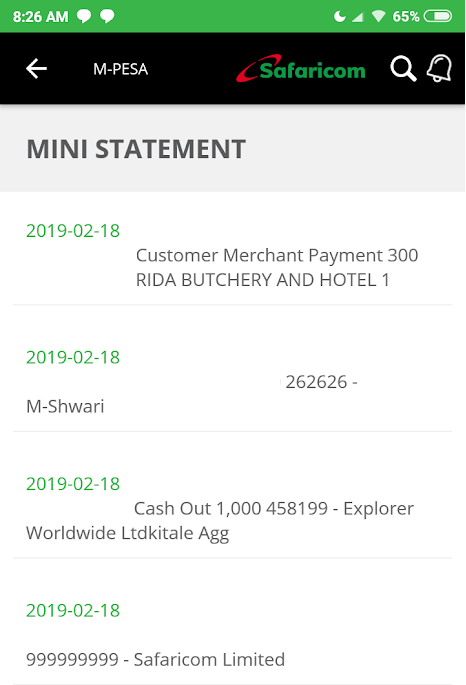
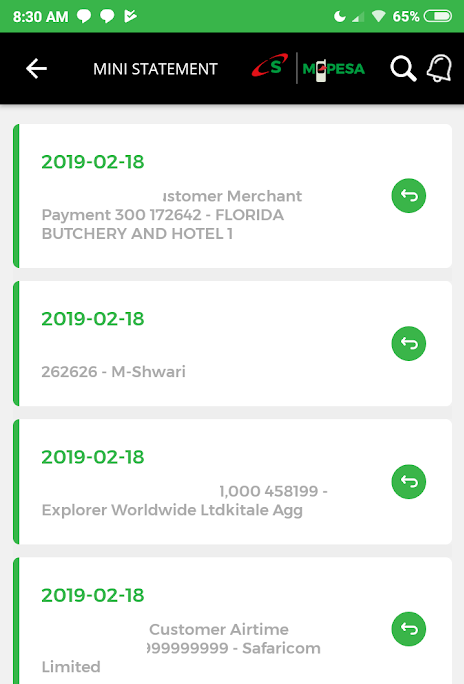
Safaricom app update Feb 2019 - before
Before
After

Once you hit the reversal icon, Safaricom will ask for a confirmation from you in order to initiate the reversal, but of course, we don’t know the caveats involved. For instance, can the feature still be effective hours or even days after the transaction? How long is the wait?
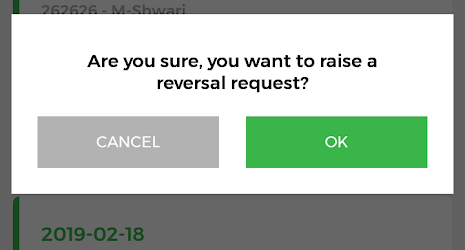
Safaricom app update Feb 2019 prompt

Although I didn’t try to reverse any transaction for obvious reasons, I can still see the icon against transactions that are a few days old. Interestingly, the icon is also visible on Lipa na M-Pesa transactions and even those for buying airtime and transferring money between M-Pesa and Mshwari, but why would one want to reverse a transaction they did between M-Pesa and Mshwari?

READ:  Huawei Y7 Prime 2019 starts selling at Safaricom shops

Besides the new send money reversal request, the update to version 1.4.0.8 also improves the prepaid usage statement under the Check Balance option, where you can now see your last ten transactions and the charges incurred in the process.
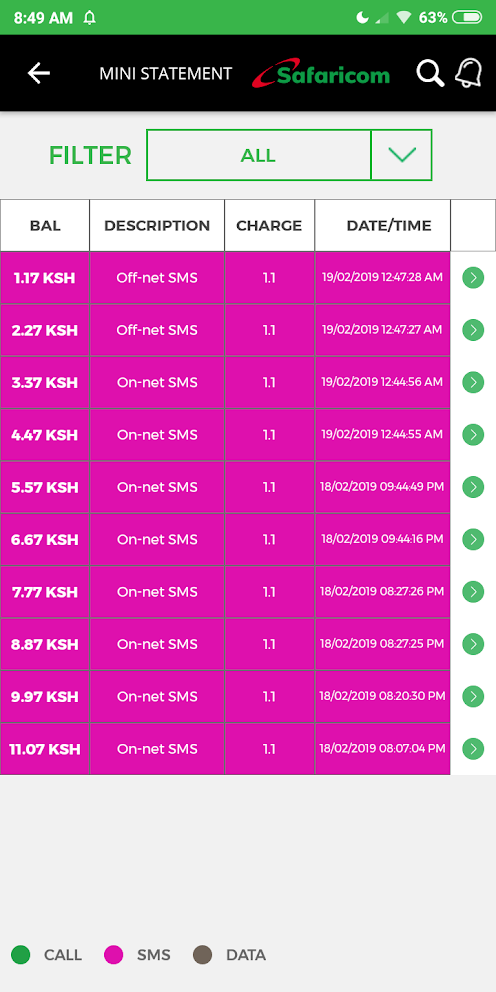
Safaricom app update Feb 2019

Also, it’s obvious that the telco has redone the UI as seen in the screengrabs but not by much.

It’s worth noting that this update is still in beta, but we expect these features to hit the stable channel in the coming days.


READ:  The mySafaricom app now has a beta testing program, here’s how to join
Join our Telegram channel
Previous Post

Huawei Y7 Prime 2019: 3 features you’ll like

Next Post

Opera for Android version 50 brings improved ad-blocking, PiP and more

Related Posts

Safaricom Home Fibre customers are getting free Showmax streaming this April
Deals

Safaricom offering 25% off Home Fibre Gold package subscriptions

February 20, 2025
Safaricom
News

Uber partners with Safaricom to provide free data for Kenyan riders and drivers

January 16, 2025
Safaricom-featured-image
News

Safaricom’s statement on private data sharing allegations refutes live location tracking claims

January 16, 2025
Next Post
Opera for Android version 50 brings improved ad-blocking, PiP and more

Opera for Android version 50 brings improved ad-blocking, PiP and more

Leave a Reply Cancel reply

Your email address will not be published. Required fields are marked *

Subscribe to our newsletter

  • Trending
  • Comments
  • Latest
Google Pay Is Finally Working in Kenya, But There Is a Catch

Google Pay Is Finally Working in Kenya, But There Is a Catch

October 7, 2026
Infinix Hot 30 review: Budget excellence

Infinix Hot 30 review: Budget excellence

November 17, 2023
My-Airtel-app

Airtel confirms it’s working on offline mode for My Airtel app

January 16, 2025
Android devices victims of preinstalled malware, new report shows

Tool that added Google Play to Windows 11 secretly installed malware

April 21, 2022
WhatsApp Now Lets You Call People Who Don’t Have an Account

WhatsApp Now Lets You Call People Who Don’t Have an Account

0
Google Pay Is Finally Working in Kenya, But There Is a Catch

Google Pay Is Finally Working in Kenya, But There Is a Catch

0
Samsung Galaxy Tab S12 Series Gets Major Upgrades, But There Is a Catch

Samsung Galaxy Tab S12 Series Gets Major Upgrades, But There Is a Catch

0
Samsung Galaxy SmartTag3 Can Track Your Stuff for More Than Two Years

Samsung Galaxy SmartTag3 Can Track Your Stuff for More Than Two Years

0
WhatsApp Now Lets You Call People Who Don’t Have an Account

WhatsApp Now Lets You Call People Who Don’t Have an Account

October 14, 2026
Google Pay Is Finally Working in Kenya, But There Is a Catch

Google Pay Is Finally Working in Kenya, But There Is a Catch

October 7, 2026
Samsung Galaxy Tab S12 Series Gets Major Upgrades, But There Is a Catch

Samsung Galaxy Tab S12 Series Gets Major Upgrades, But There Is a Catch

September 30, 2026
Samsung Galaxy SmartTag3 Can Track Your Stuff for More Than Two Years

Samsung Galaxy SmartTag3 Can Track Your Stuff for More Than Two Years

September 30, 2026
  • About
  • Advertise
  • Privacy Policy
  • Contact

© 2026 Android Kenya

No Result
View All Result

© 2026 Android Kenya

Loading Comments...