There’s no lying, it can be way too easy to lose track of time once you go down the rabbit hole that is the world of YouTube. I mean, what else are we supposed to do with our free time, right?
With mobile network operators being too generous with YouTube-specific bundles, most of which are free add-ons to existing data plans, there’s more room to be a bit careless today than ever before. The devices have gotten better, too. In place of qHD smartphones, we now have the majority of smartphones having at least HD displays.
The implication here is that that has come at a cost, at least to the user since the network operators are just too glad to sell more and more data bundles to fuel our newfound thirst for online videos. Long gone are the days when it was wise to recommend playing videos at 480p by default. Those high-res displays have to be put to good use, after all.
Even then, it is a good thing to familiarize ourselves, once again, with the tools available at our disposal that would make it easy to account for the data we spend on our favourite pastime. I mean, at the end of the day we are the same ones who end up digging deeper into our pockets since the data bundles we bought last time ran out faster than expected, right?
Limit mobile data usage using the YouTube app
Buried deep in the settings section of YouTube’s main application is the option to “Limit mobile data usage”.
What this means is that when the option is turned on, any videos playing on your smartphone are limited in quality. What this means is that videos will only play in HD when one is on Wi-Fi.
This is complementary to the change Safaricom made to its systems last year, which by default, limits all videos to 480p, leaving room for the user to bump up the quality as they wish. It is a better way of keeping one’s data usage in check especially if they own a device that allows video playback at 1080p or 1440p.

For those of us that prefer our videos crisp and all, this shouldn’t be an issue at all as there is a price to pay for the high-quality streams we enjoy. For many that just want a good enough video experience or are on a tight budget or want to stretch their data bundles a little longer, having that cap on is important as it allows for a level of control and no room for surprises should one just click through a YouTube video from a link shared on another platform or be worried when someone else (like kids, for instance) does so.
Tethering
A number of users privileged enough to have access to computing devices like laptops are able to transition from the small smartphone displays (are they small anymore?) to the bigger screens on such devices and continue enjoying whatever it is that they enjoy. This is well and good if one is doing so while connected to a hotspot that is not reliant on the user’s (or some other person’s) smartphone connection. Where it is, tethering, it can be costly.
This is because if one has any of those free YouTube bundles that they get upon activation of services like Tunukiwa or All In One bundles, the same does not apply here. In such a case, the usual data bundles end up being consumed. Without applying the same precautions already recommended above, that consumption rate will be even faster than on mobile. And that is assuming it is just YouTube on the browser it is being accessed from that is consuming data. Most times, that’s not the case.
Data Manager
At this point, the Data Manager should be familiar to just about anyone who uses Safaricom’s mobile data. It is the best way of cutting down on unwanted expenses by making sure that one’s mobile credit is not consumed the moment their data bundles are exhausted.
That is not all about it, though. The data manager allows users to “save data by reducing speed” using its Data Save feature.
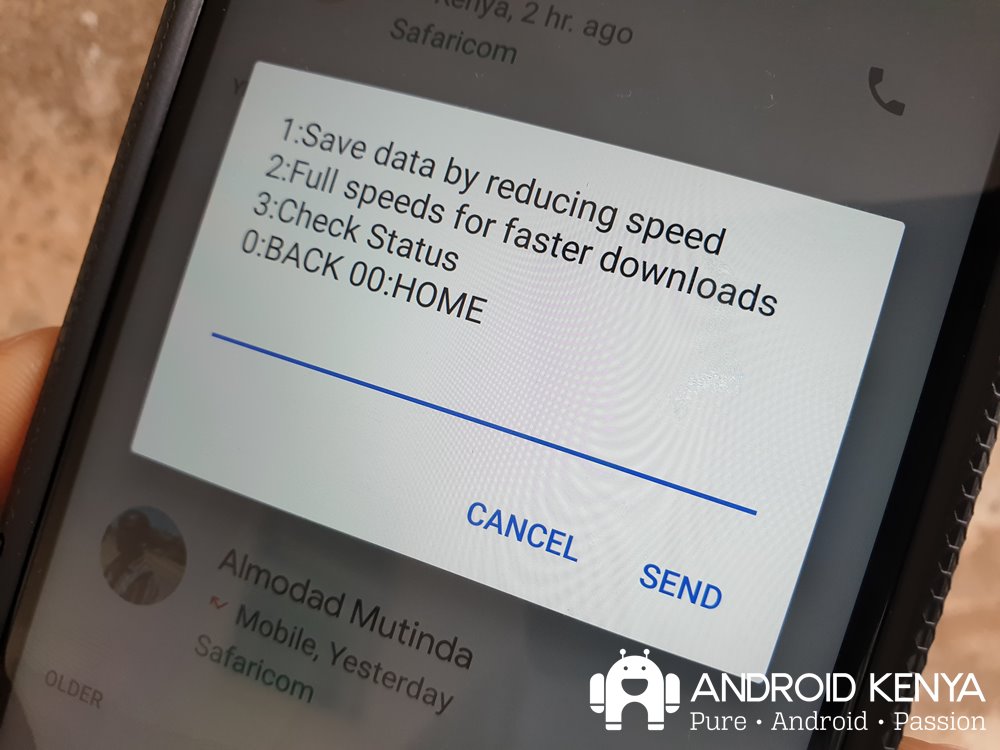
The feature, accessible through the *544# shortcode came into being last year alongside another one that Safaricom has since silently withdrawn: the ability to rein in on app updates using the Data Manager.
Others
Ther are other ways of reining in YouTube data usage that we have previously explored. See them below.