


The software experience is central to the functionality of the Rafiki by Securex home kit.
Unlike the hardware, which has multiple components – the alarm panel and the sensors being key – the software has only one component: the application.
Basically, your entire interaction with the Rafiki home solution, as you can see on the installation manual, starts with downloading and installing the application from the Google Play Store (see link below).
Once that is done, everything else is fair game.
It can be tempting to assume that you’ll have everything figured out but from our experience, besides the basics, you may either overlook some interesting features and functionality that isn’t front and centre or a key part of the experience or take a little longer to unearth them. Well, that is why we are here. To give you the 411…
On your Android smartphone, when using the Rafiki by Securex app, the most important section is the notification shade. Here is where the app will constantly alert you on ongoing events at home (whether you are away or inside).
However, before we get here, the assumption is that, based on the version of Android that your smartphone is running and the custom software from the device maker (e.g. ColorOS for Oppo smartphones, MIUI for Xiaomi devices, One UI for Samsung phones and so on, you get the drift), you will have figured out how to make sure that the app is always running on your phone and not limited by your device’s system as is bound to happen if you don’t play around with the settings app. The good things is that, during the installation, you’ll be prompted in-app to make the necessary adjustments.
Back to the app, beyond the Away, Disarmed and Stay buttons which are very prominent, one can use it – and this is our favourite feature of the whole app – to automate some tasks.
Like, what happens when the alarm goes off, for instance? Given that this security system is supplied and backed by a security services organization, Securex, you can arrange for an additional service where your home’s security is enhanced with a response from a security team should the alarm go off. This will be way of sending a message to the message centre. And you can define when exactly this happens. Say for two hours in the morning when you’re out for your morning run. Or the 10 hours when you’re away to attend to work and other duties. Or, if you are like yours truly and are working from home, the two days of the weekend when you’re out having some semblance of fun and need a third eye watching over your space.
If you have a house manager maybe you can train them to press the SOS button when danger arises which will, in turn, trigger the alarm at a high volume so that any local security at your place of residence can hear it and respond, hopefully in good time.
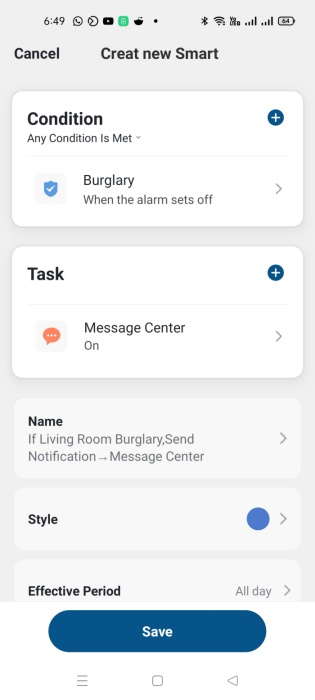
Doesn’t that sound fantastic? The automation is hands-down one of the most impressive smart features.
For those that have other people at home even when they are away, an interesting way of checking the activity way is just going to the Messages button at the bottom of the app. Here, one gets an at-a-glance look of what’s been going on and the status of each device that is part of the security system including any additional sensors. This can come in handy when doing an audit as one can clearly tell when the system went offline, for instance and, if there is any, the nature of the emergency triggered.
There is an indicated integration with a voice assistant but we have not interacted with it, yet – maybe you can explore?








Comments 1