• About
  • Advertise
  • Privacy Policy
  • Contact
Android Kenya
  • Home
  • News
  • Apps
  • Gadgets
  • Reviews
  • Deals
  • How To
  • Knowledge Base
No Result
View All Result
  • Home
  • News
  • Apps
  • Gadgets
  • Reviews
  • Deals
  • How To
  • Knowledge Base
No Result
View All Result
Android Kenya
No Result
View All Result
Home Apps

Google Messages is making dual-SIM texting a headache

Hillary Keverenge by Hillary Keverenge
February 13, 2025
in Apps, News
0
Android Messages Beta program
FacebookTwitterWhatsApp

If you’re like me and rely on your dual-SIM smartphone to juggle between Safaricom and Airtel like a pro, then you’re about to get a rude awakening. Google Messages, the go-to texting app for many Android users, is rolling out a change that no one asked for, and frankly, it’s a step backward for anyone who values convenience.

Right now, when you’re texting your cousin about that weekend plan or your colleague about that urgent work update, switching between SIMs is as easy as tapping the SIM icon in the compose box. Google Messages even remembers your choice for the next time you text that person. It’s smooth, it’s quick, and it just works. But guess what? Google has decided to “fix” what wasn’t broken.
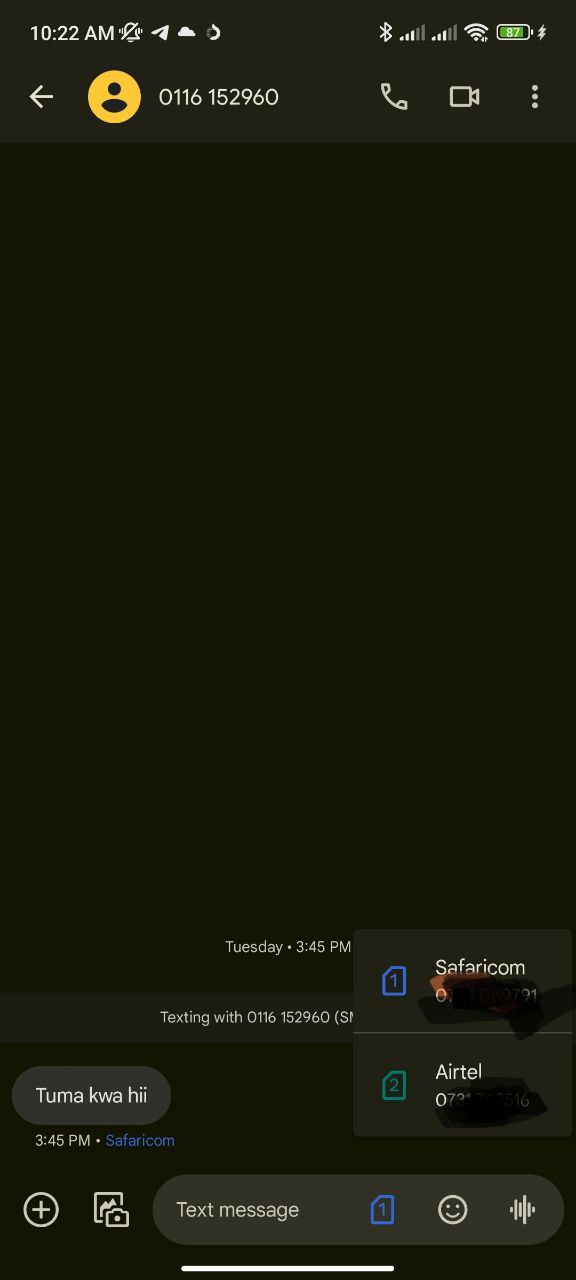
Google-Messages-SIM-swap
Current UI with SIM swap icon in compose section

In the latest beta version of Google Messages, the handy SIM swap icon in the compose box has vanished. Instead, if you want to switch SIMs for a specific contact, you’ll now have to dive into the conversation details section. You’ll need to navigate through menus just to tell your phone, “Hey, use Airtel this time, not Safaricom.”

Below is the new Google Messages SIM swap setting in Profile/Conversation section.
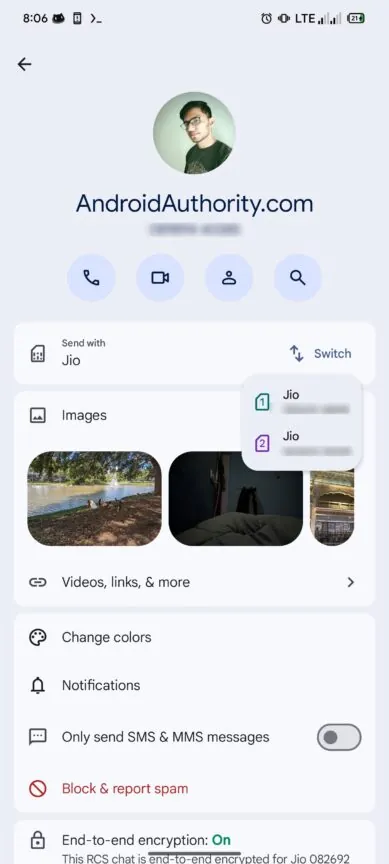
Google-Messages-SIM-switch-settings

Now, I don’t know about you, but this feels like a personal attack on my texting efficiency. I switch between Safaricom and Airtel all the time, depending on who I’m texting and what offers I’m trying to maximize. This new change adds an unnecessary extra step, and honestly, it’s frustrating.

READ:  Xiaomi Mi Note 3 is a bigger Xiaomi Mi 6 with a weaker processor

To make matters worse, the only hint you’ll get about which SIM is being used is a tiny prompt that says, “Sending with (Safaricom or Airtel SIM name).” No quick swap, no instant change — just a reminder of what you’re stuck with unless you’re willing to go digging through settings. Here’s a screenshot of the new Google Messages UI with no SIM swap icon in the message composition section.
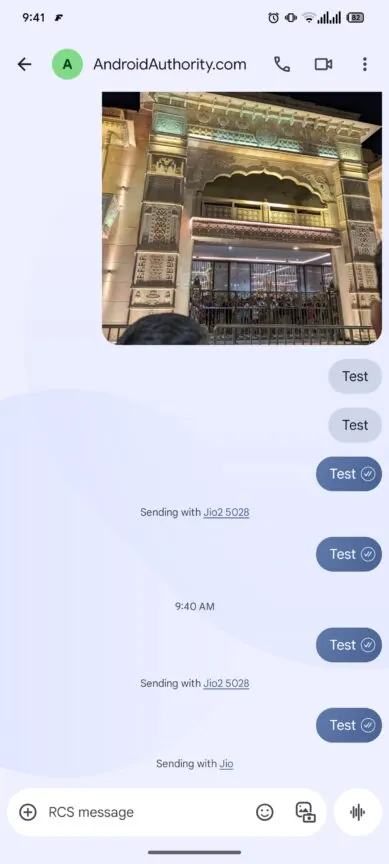
Google-Messages-removes-SIM-switch-setting-in-compose

Sure, you can still set a default SIM for all your messages in the app’s settings (Settings > Network & Internet > Calls & SMS > SMS). But let’s be real — how many of us want to be locked into one SIM for every conversation? Not me. And probably not you either.

So, Google, if you’re listening: I love my dual-SIM phones, and I love the convenience of quickly switching between SIM cards when texting in Google Messages. Please don’t take that away. Stick with the SIM swap icon, and let us text in peace.

In the meantime, if you’re as annoyed as I am about this change, let’s make some noise. Share this article, tweet at Google, and let them know that sometimes, simplicity is better than change. After all, if it ain’t broke, don’t fix it!


Join our Telegram channel
Previous Post

DeepSeek’s growing footprint in Android phones shows it’s only a matter of time

Next Post

Samsung Galaxy S25 series officially goes on sale in Kenya

Related Posts

WhatsApp Working on Premium Subscription Plan Called WhatsApp Plus
News

WhatsApp Working on Repositioning Channels Within The App

May 1, 2026
Google testing Ask YouTube
News

Google Testing a New Way of Finding Videos on YouTube

April 28, 2026
Samsung Remains the Only Android OEM in Q3 2025’s Top-Selling Phones
News

Samsung Pushes Update to Midrange and Budget Galaxies

April 28, 2026
Next Post
Samsung launches Galaxy S25 series, already up for pre-order in Kenya

Samsung Galaxy S25 series officially goes on sale in Kenya

Subscribe to our newsletter

  • Trending
  • Comments
  • Latest
Samsung Remains the Only Android OEM in Q3 2025’s Top-Selling Phones

Samsung Pushes Update to Midrange and Budget Galaxies

April 28, 2026
Tecno Spark 3 Pro-10

How to fix OTG connected pop-up error on Tecno phones

July 28, 2019
Oppo Reno8 T review: High praise

Oppo Reno8 T review: High praise

February 28, 2023

Oppo A60 review: Rugged darling

June 10, 2024
WhatsApp Working on Premium Subscription Plan Called WhatsApp Plus

WhatsApp Working on Repositioning Channels Within The App

0
Google testing Ask YouTube

Google Testing a New Way of Finding Videos on YouTube

0
Samsung Remains the Only Android OEM in Q3 2025’s Top-Selling Phones

Samsung Pushes Update to Midrange and Budget Galaxies

0
Samsung at Risk of Losing Global Smartphone Crown to Major Rival – Report

Samsung Retains Top Spot in Global Smartphone Shipments Amid Memory Constraints

0
WhatsApp Working on Premium Subscription Plan Called WhatsApp Plus

WhatsApp Working on Repositioning Channels Within The App

May 1, 2026
Google testing Ask YouTube

Google Testing a New Way of Finding Videos on YouTube

April 28, 2026
Samsung Remains the Only Android OEM in Q3 2025’s Top-Selling Phones

Samsung Pushes Update to Midrange and Budget Galaxies

April 28, 2026
Samsung at Risk of Losing Global Smartphone Crown to Major Rival – Report

Samsung Retains Top Spot in Global Smartphone Shipments Amid Memory Constraints

April 16, 2026
  • About
  • Advertise
  • Privacy Policy
  • Contact

© 2025 Android Kenya

No Result
View All Result

© 2025 Android Kenya


Loading Comments...