• About
  • Advertise
  • Privacy Policy
  • Contact
Android Kenya
  • Home
  • News
  • Apps
  • Gadgets
  • Reviews
  • Deals
  • How To
  • Knowledge Base
No Result
View All Result
  • Home
  • News
  • Apps
  • Gadgets
  • Reviews
  • Deals
  • How To
  • Knowledge Base
No Result
View All Result
Android Kenya
No Result
View All Result
Home How To

Enabling Google Assistant on your Android smartphone breaks Google Now on Tap, here’s how to get it back!

Emmanuel Chenze by Emmanuel Chenze
March 10, 2017
in How To
0
Enabling Google Assistant on your Android smartphone breaks Google Now on Tap, here’s how to get it back!
FacebookTwitterWhatsApp

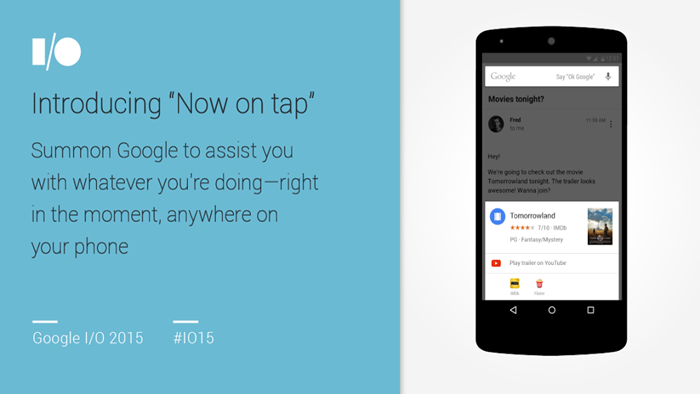
Google Assistant is finally here with us. Whether officially or unofficially, at least some of us (those who are lucky to be on Android Nougat or Marshmallow) have access to Google’s personal smart assistant. However, by enabling Assistant on our devices we traded in something else that we had grown accustomed to and was equally valuable: Google Now on Tap.

Assistant essentially replaces Google Now on Tap. Google Now on Tap is the advancement to good old Google Now that Google introduced with Android Marshmallow in 2015. It reads the information on your screen and places it in its immediate context providing useful add-on information on the names, characters etc one is staring at on their device’s screen. All that vanishes in an instant the moment Google Assistant shows up on the front door.

While Google Now can still be accessed through the Google app (another inconvenience; I’ve resorted to waiting till there’s a notification from it), there’s just no way to get back Now on Tap. At least not one prescribed by Google.

Since Google Assistant is currently limited to the United States and a handful of other countries, it is not that hard to game the system and do away with it at will and revert to having Now on Tap’s useful contextual information at the long tap of the home button. Here’s how to go about that:

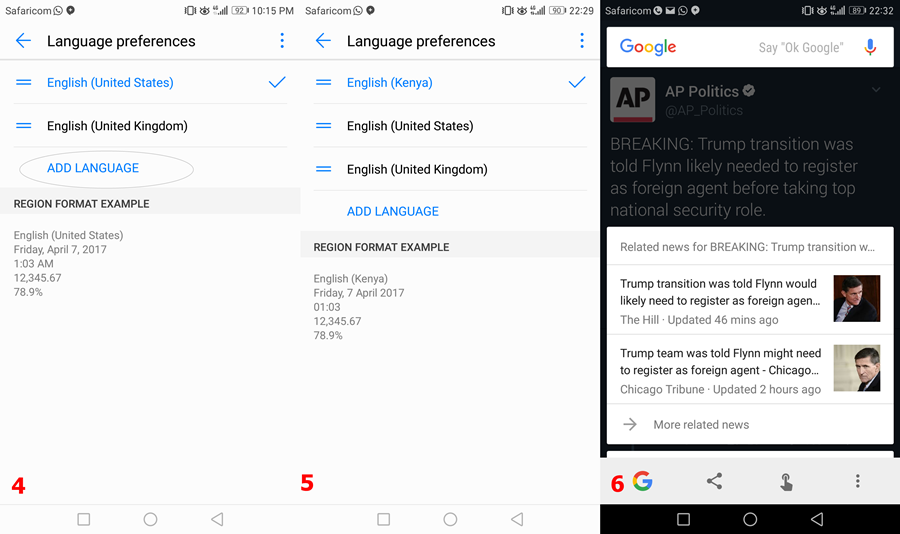
  • Open the Settings app on your Android smartphone
  • Go to Language & Input
  • Go to Language
  • Click on Add Language
  • Select English then pick a region that is not the US like, say, English (Canada), English (Kenya – yes, Huawei has this, not sure about other devices), English (India) etc.
  • Tap the options menu and remove English (US)
  • Google Assistant is gone!
READ:  How to pre-order the Samsung Galaxy S25 in Kenya

That is the long route.

There is always a shortcut, right?

Alternatively, you can disable Assistant and get back to having Google Now on Tap by going through Assistant itself.

Here’s how to go about it (visually):

deactivate Google Assistant

Need your Assistant back? You just need to go to Settings (app) > Language & Input and revert to English (US). Things will definitely change once Google rolls out Assistant to every English-speaking region but for now, it works so well.
Join our Telegram channel
Previous Post

Two Google Assistant alternatives worth trying on your Android smartphone

Next Post

BlackBerry’s newest Android app aims to keep all the nosy people in your life at bay

Related Posts

Full List of Android Phones Compatible With AirDrop
News

Full List of Android Phones Compatible With AirDrop

May 15, 2026
Google testing Ask YouTube
News

Google Testing a New Way of Finding Videos on YouTube

April 28, 2026
Google Slashes Play Store Fees and Makes Sideloading Easier in Major Android Overhaul
Apps

Google Slashes Play Store Fees and Makes Sideloading Easier in Major Android Overhaul

March 5, 2026
Next Post
BlackBerry’s newest Android app aims to keep all the nosy people in your life at bay

BlackBerry's newest Android app aims to keep all the nosy people in your life at bay

Subscribe to our newsletter

  • Trending
  • Comments
  • Latest
Full List of Android Phones Compatible With AirDrop

Full List of Android Phones Compatible With AirDrop

May 15, 2026
Everything Google Announced During the Android 17 Reveal

Everything Google Announced During the Android 17 Reveal

May 12, 2026
Tecno Spark 3 Pro-10

How to fix OTG connected pop-up error on Tecno phones

July 28, 2019
Oppo Reno8 T review: High praise

Oppo Reno8 T review: High praise

February 28, 2023
Full List of Android Phones Compatible With AirDrop

Full List of Android Phones Compatible With AirDrop

0
Everything Google Announced During the Android 17 Reveal

Everything Google Announced During the Android 17 Reveal

0
Apple Leaves Android Brands Playing Catch-Up in New Report

Apple Leaves Android Brands Playing Catch-Up in New Report

0
WhatsApp Working on Premium Subscription Plan Called WhatsApp Plus

WhatsApp Working on Repositioning Channels Within The App

0
Full List of Android Phones Compatible With AirDrop

Full List of Android Phones Compatible With AirDrop

May 15, 2026
Everything Google Announced During the Android 17 Reveal

Everything Google Announced During the Android 17 Reveal

May 12, 2026
Apple Leaves Android Brands Playing Catch-Up in New Report

Apple Leaves Android Brands Playing Catch-Up in New Report

May 5, 2026
WhatsApp Working on Premium Subscription Plan Called WhatsApp Plus

WhatsApp Working on Repositioning Channels Within The App

May 1, 2026
  • About
  • Advertise
  • Privacy Policy
  • Contact

© 2025 Android Kenya

No Result
View All Result

© 2025 Android Kenya


Loading Comments...