• About
  • Advertise
  • Privacy Policy
  • Contact
Android Kenya
  • Home
  • News
  • Apps
  • Gadgets
  • Reviews
  • Deals
  • How To
  • Knowledge Base
No Result
View All Result
  • Home
  • News
  • Apps
  • Gadgets
  • Reviews
  • Deals
  • How To
  • Knowledge Base
No Result
View All Result
Android Kenya
No Result
View All Result
Home How To

Netflix now lets subscribers disable content autoplay: Here’s how to do it

Emmanuel Chenze by Emmanuel Chenze
February 7, 2020
in How To, News
0
Netflix to start charging users in Kenya Shillings
FacebookTwitterWhatsApp

With mobile users getting some savings on their data consumption, albeit on select content, those of us that prefer to watch Don’t F*** With The Cats on bigger screens may be feeling left out. And rightfully so.

However, there’s some saving grace.

If you find how content immediately starts auto-playing on Netflix on your computer or Android-based streaming box or your smart TV as you are just scrolling through the homepage annoying then Netflix has finally heard your prayers and curses by availing a way to just turn it all off. Good riddance!

Here’s how to do it:

1. Sign in to your Netflix account on the web – yes you still can’t do this directly from your Android TV box or smart TV or even the mobile app.

2. Click on your profile photo on the upper right-hand side of the page/screen

3. Select Manage Profiles

4. Select the profile where you want to disable preview auto-plays on by clicking on the pen icon
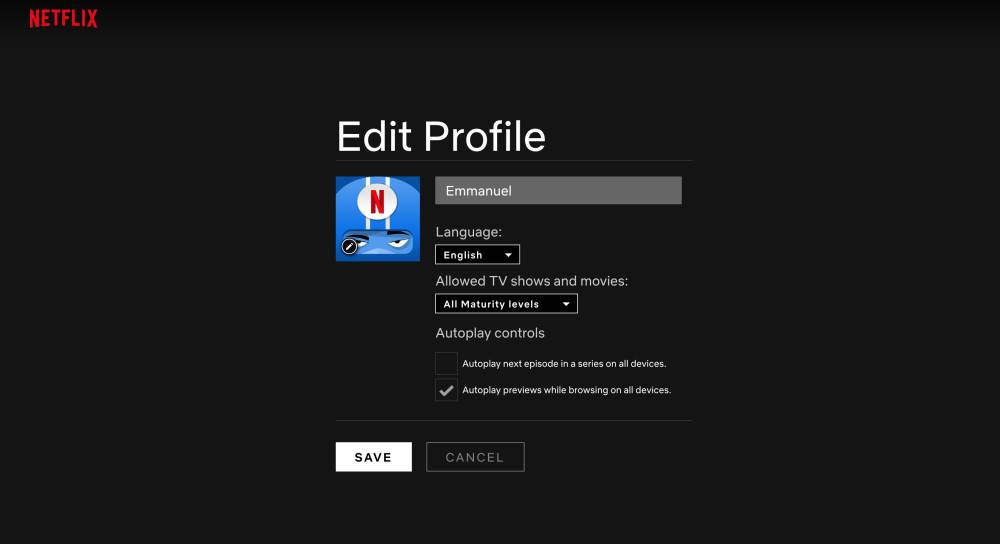
5. Uncheck Autoplay previews while browsing on all devices.

6. Click Save

All settings take effect on all the devices one is signed on to for the selected profile.

Since, like the recent change in billing terms, such changes can take a while to effect, you can switch to another profile on your device and then get back to the one where you have disabled autoplay previews moments after in order to force the change immediately.

READ:  Netflix for who? This app lets you watch movies and TV shows legally for free
Join our Telegram channel
Previous Post

Netflix goes for data-saving gains on mobile as it adopts AV1 codec

Next Post

Chinese device makers gang up to take on Google Play

Related Posts

Netflix set to end free streaming plan in Kenya
News

Netflix set to end free streaming plan in Kenya

October 3, 2023
Netflix to start charging users in Kenya Shillings
News

Netflix’s crackdown on password-sharing hits the Kenyan market

July 20, 2023
Netflix to start charging users in Kenya Shillings
News

Revised Netflix rates in Kenya effective February 2023

March 9, 2023
Next Post
Xiaomi Kenya’s Black Friday deals on Jumia

Chinese device makers gang up to take on Google Play

Leave a Reply Cancel reply

Your email address will not be published. Required fields are marked *

Subscribe to our newsletter

  • Trending
  • Comments
  • Latest
Kenya-Power

Kenya Power’s MyPower app gets a major upgrade

January 16, 2025

Oppo A60 review: Rugged darling

June 10, 2024
Tecno Spark 3 Pro-10

How to fix OTG connected pop-up error on Tecno phones

July 28, 2019
Oppo Reno8 T review: High praise

Oppo Reno8 T review: High praise

February 28, 2023
Samsung Galaxy S26 series

Rumoured Samsung Galaxy S27 Pro Could Render the Plus Useless

0
BREAKING: Samsung Announces Galaxy S26 Series

Samsung Adds AirDrop Support to Select Galaxy Devices

0
Nothing Phone 4a Pro

Nothing Phone 4a Pro Breaks Cover With Its Most Striking Design Yet

0
WhatsApp Working on Premium Subscription Plan Called WhatsApp Plus

WhatsApp Working on Premium Subscription Plan Called WhatsApp Plus

0
Samsung Galaxy S26 series

Rumoured Samsung Galaxy S27 Pro Could Render the Plus Useless

April 6, 2026
BREAKING: Samsung Announces Galaxy S26 Series

Samsung Adds AirDrop Support to Select Galaxy Devices

March 23, 2026
Nothing Phone 4a Pro

Nothing Phone 4a Pro Breaks Cover With Its Most Striking Design Yet

March 5, 2026
WhatsApp Working on Premium Subscription Plan Called WhatsApp Plus

WhatsApp Working on Premium Subscription Plan Called WhatsApp Plus

March 5, 2026
  • About
  • Advertise
  • Privacy Policy
  • Contact

© 2025 Android Kenya

No Result
View All Result

© 2025 Android Kenya


Loading Comments...




