• About
  • Advertise
  • Privacy Policy
  • Contact
Android Kenya
  • Home
  • News
  • Apps
  • Gadgets
  • Reviews
  • Deals
  • How To
  • Knowledge Base
No Result
View All Result
  • Home
  • News
  • Apps
  • Gadgets
  • Reviews
  • Deals
  • How To
  • Knowledge Base
No Result
View All Result
Android Kenya
No Result
View All Result
Home News

Samsung rolls out privacy-protecting Maintenance Mode

Naftaly Kariuki by Naftaly Kariuki
November 7, 2022
in News
0
Samsung commits to updating Galaxy Note 20 and Note 20 Ultra across 3 generations of Android versions
FacebookTwitterWhatsApp

Ever had to take in your phone for repairs with all your photos, accounts and messages being visible to the repair person and anyone else that comes into contact with your phone? Well, Samsung has come up with a workaround that ensures that does not happen again.

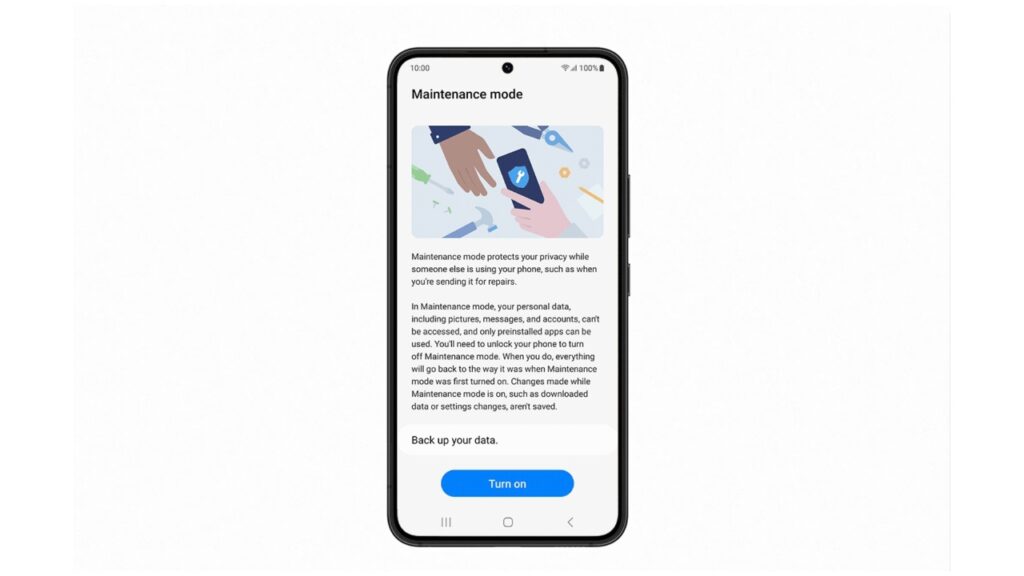
Called ‘Maintenance Mode’, this new feature is designed to keep your messages, photos, info and accounts safe when you are getting your phone repaired or being handled by a person you don’t want snooping around. It has been in testing since July, got its first release in China in September, and now the South Korean company is rolling it out globally to the Galaxy S22 series, with more phones expected to receive the update in the coming months.

In a press release, Samsung explains that Maintenance Mode creates a separate user account that will let someone else access the “Core Functions” of the phone without being able to see any of your data. It is very similar in principle to ‘Guest Mode’ on Windows PCs.

A repair person in this case will be able to test everything on your phone, without being able to access any of your information. If he installs anything on the phone such as test photos, other applications and the like, they will all be erased once you are handed back your device, and you unlock it to turn off Maintenance Mode.
It is important to note that Maintenance Mode will only be available to Samsung devices running Android 13. Take a look at our previous article to estimate when your device will get the One UI 5 update that is based on Android 13.

READ:  WhatsApp finally gets group voice and video calling

To turn Maintenance Mode on, navigate to Settings, then to the battery and device care section of the device. Tap on the Turn On button and your phone will restart in Maintenance Mode.

To switch it off, drag the notification panel and click the notification to restart the phone. You will, however, first need to enter your password or fingerprint for the phone to reboot into the normal operating mode, ensuring no one boots it out of Maintenance Mode without your authorization.
Join our Telegram channel
Previous Post

USB-C hits 120 Gbps with new USB4 version 2.0 spec

Next Post

Apple Music is getting more expensive everywhere, including in Kenya

Related Posts

Samsung Remains the Only Android OEM in Q3 2025’s Top-Selling Phones
News

Samsung Pushes Update to Midrange and Budget Galaxies

April 28, 2026
Samsung at Risk of Losing Global Smartphone Crown to Major Rival – Report
News

Samsung Retains Top Spot in Global Smartphone Shipments Amid Memory Constraints

April 16, 2026
Samsung Galaxy S26 series
News

Rumoured Samsung Galaxy S27 Pro Could Render the Plus Useless

April 6, 2026
Next Post
Apple Music is getting more expensive everywhere, including in Kenya

Apple Music is getting more expensive everywhere, including in Kenya

Leave a Reply Cancel reply

Your email address will not be published. Required fields are marked *

Subscribe to our newsletter

  • Trending
  • Comments
  • Latest
Samsung Remains the Only Android OEM in Q3 2025’s Top-Selling Phones

Samsung Pushes Update to Midrange and Budget Galaxies

April 28, 2026
WhatsApp Working on Premium Subscription Plan Called WhatsApp Plus

WhatsApp Working on Repositioning Channels Within The App

May 1, 2026
Tecno Spark 3 Pro-10

How to fix OTG connected pop-up error on Tecno phones

July 28, 2019
Oppo Reno8 T review: High praise

Oppo Reno8 T review: High praise

February 28, 2023
WhatsApp Working on Premium Subscription Plan Called WhatsApp Plus

WhatsApp Working on Repositioning Channels Within The App

0
Google testing Ask YouTube

Google Testing a New Way of Finding Videos on YouTube

0
Samsung Remains the Only Android OEM in Q3 2025’s Top-Selling Phones

Samsung Pushes Update to Midrange and Budget Galaxies

0
Samsung at Risk of Losing Global Smartphone Crown to Major Rival – Report

Samsung Retains Top Spot in Global Smartphone Shipments Amid Memory Constraints

0
WhatsApp Working on Premium Subscription Plan Called WhatsApp Plus

WhatsApp Working on Repositioning Channels Within The App

May 1, 2026
Google testing Ask YouTube

Google Testing a New Way of Finding Videos on YouTube

April 28, 2026
Samsung Remains the Only Android OEM in Q3 2025’s Top-Selling Phones

Samsung Pushes Update to Midrange and Budget Galaxies

April 28, 2026
Samsung at Risk of Losing Global Smartphone Crown to Major Rival – Report

Samsung Retains Top Spot in Global Smartphone Shipments Amid Memory Constraints

April 16, 2026
  • About
  • Advertise
  • Privacy Policy
  • Contact

© 2025 Android Kenya

No Result
View All Result

© 2025 Android Kenya


Loading Comments...