• About
  • Advertise
  • Privacy Policy
  • Contact
Android Kenya
  • Home
  • News
  • Apps
  • Gadgets
  • Reviews
  • Deals
  • How To
  • Knowledge Base
No Result
View All Result
  • Home
  • News
  • Apps
  • Gadgets
  • Reviews
  • Deals
  • How To
  • Knowledge Base
No Result
View All Result
Android Kenya
No Result
View All Result
Home How To

Android 8.0 Oreo beta comes to the Nokia 6: Here’s how to get it

Emmanuel Chenze by Emmanuel Chenze
December 20, 2017
in How To, News
0
Android 8.0 Oreo beta comes to the Nokia 6: Here’s how to get it
FacebookTwitterWhatsApp

Android Oreo is finally out on the Nokia 6. Well, at least in beta. This comes just a week since the same update was made available to its smaller sibling the Nokia 5.

Since I have the Nokia 6 in for review, I’ve been fighting the urge to go rogue and put the device on test software and hope that it doesn’t affect the final view of the device that I hold and which will inform the review I eventually pen. Once I decided that I would be going ahead, the next challenge was getting the Oreo update itself.

Turns out, it’s really easy.

1. Head over to the Nokia beta labs site.

2. Sign up for a Nokia account. After signing up, confirm the email from your inbox then sign in. This is assuming you didn’t have one already. If you already have one then just sign in.

3. You will be redirected to the community/forums site.

READ:  Kilimall delivers belly ring instead of tongue ring, rejects refund request, asks customer to straighten up belly ring and use it as tongue ring

4. Go back to the link in point number 1 above [here it is again]

5. Scroll down to validate your Nokia 6 using its IMEI. Don’t worry, there are on-screen instructions on how to go about this in case you don’t know where to find it. Be sure to key in the carrier (the mobile network operator on whose network the Nokia 6 is using) since it is necessary for the validation.
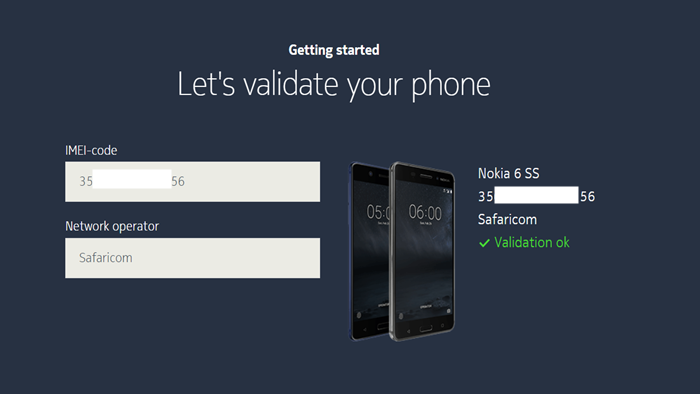
I am not so sure what really happens with the validation and if they do turn down some devices but it would be interesting to hear of any devices that get rejected. The device I have was given to me by HMD Global’s local PR so it’s definitely in their database as will surely be those that are bought via Safaricom and several other retailers selling the device but what about the many imports dotting various online marketplaces (on Facebook and elsewhere) locally? Or the validation check simply looks at the software running on these devices for compatibility and not much else?

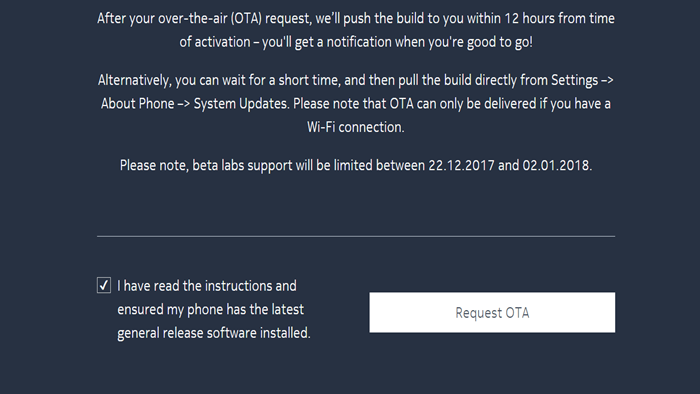
6. Once the device is validated, as per what is set out in step 5 above, scroll further down to request for the beta to be sent to your device over the air (OTA).
That’s it!

While one is advised that the OTA will be pushed in at least 12 hours, mine arrived instantly. Download (it’s 1.1GB), install and enjoy.
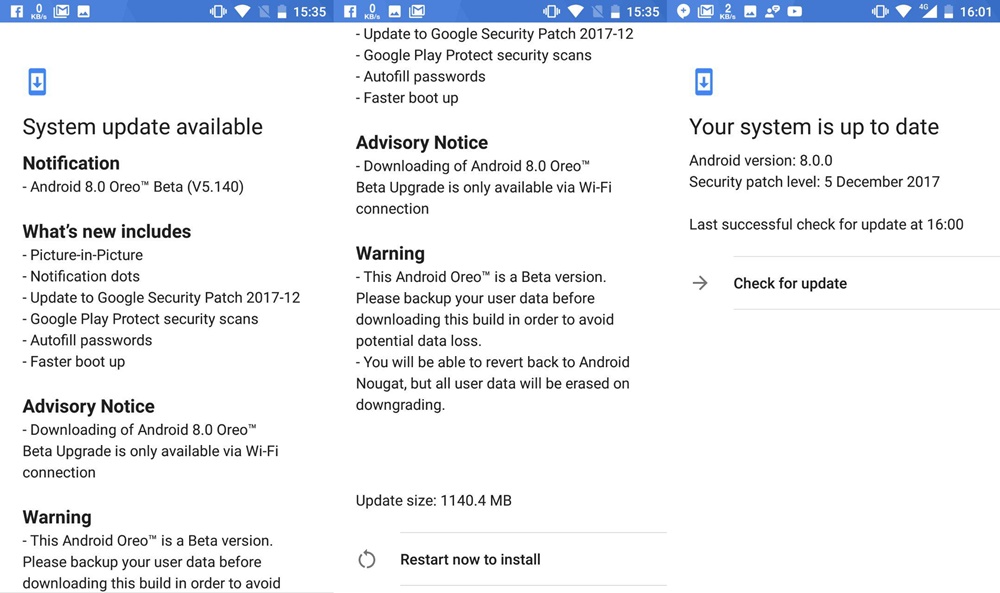
 

Note: For a Nokia 6 to get the Android Oreo beta, it must be on these software versions: V3.700_SP02, V3.72A_SP01 or V3.73A_SP01. You can check which version from “About phone” in the device settings.
Join our Telegram channel
Previous Post

Deal: Infinix Zero 4 down to Sh 14,999 on Jumia (save Sh 3,500)

Next Post

Latest update to the OPPO F5 brings the SIM Toolkit to the home screen

Related Posts

HMD-Global-and-Nokia
News

HMD Global officially wipes Nokia out of existence

February 1, 2024
First self-branded HMD smartphone might be one produced for Kenya-based M-Kopa
News

First self-branded HMD smartphone might be one produced for Kenya-based M-Kopa

November 10, 2023
Nokia X30 5G, the brand’s “most eco-friendly smartphone”, launched in Kenya
News

Nokia X30 5G, the brand’s “most eco-friendly smartphone”, launched in Kenya

May 22, 2023
Next Post
Latest update to the OPPO F5 brings the SIM Toolkit to the home screen

Latest update to the OPPO F5 brings the SIM Toolkit to the home screen

Subscribe to our newsletter

  • Trending
  • Comments
  • Latest
Android Users to Lose More Google Storage Under New Backup Policy

Android Users to Lose More Google Storage Under New Backup Policy

July 16, 2026
Xiaomi-Redmi-Note-13

Redmi Note 13 series bootloader unlock error claiming ‘system is being upgraded’ gets acknowledged

March 21, 2024
Tecno Spark 3 Pro-10

How to fix OTG connected pop-up error on Tecno phones

July 28, 2019
How to Check Your 2025 KCSE Results: Step-by-Step Guide and SMS Option

How to Check Your 2025 KCSE Results: Step-by-Step Guide and SMS Option

January 9, 2026
Google Wants Your Face to Become Your New Password

Google Wants Your Face to Become Your New Password

0
Samsung Unveils Galaxy Z Fold8 Ultra, Fold8 and Flip8 as Apple Prepares to Enter Foldable Market

Samsung Unveils Galaxy Z Fold8 Ultra, Fold8 and Flip8 as Apple Prepares to Enter Foldable Market

0
Android Users to Lose More Google Storage Under New Backup Policy

Android Users to Lose More Google Storage Under New Backup Policy

0
Samsung Drops Samsung Pass Updates for Older Android Devices

Samsung Drops Samsung Pass Updates for Older Android Devices

0
Google Wants Your Face to Become Your New Password

Google Wants Your Face to Become Your New Password

July 24, 2026
Samsung Unveils Galaxy Z Fold8 Ultra, Fold8 and Flip8 as Apple Prepares to Enter Foldable Market

Samsung Unveils Galaxy Z Fold8 Ultra, Fold8 and Flip8 as Apple Prepares to Enter Foldable Market

July 22, 2026
Android Users to Lose More Google Storage Under New Backup Policy

Android Users to Lose More Google Storage Under New Backup Policy

July 16, 2026
WhatsApp Working on Premium Subscription Plan Called WhatsApp Plus

WhatsApp Developing First-Party Backup That Fixes Its Biggest Flaw

July 14, 2026
  • About
  • Advertise
  • Privacy Policy
  • Contact

© 2025 Android Kenya

No Result
View All Result

© 2025 Android Kenya

Loading Comments...