• About
  • Advertise
  • Privacy Policy
  • Contact
Android Kenya
  • Home
  • News
  • Apps
  • Gadgets
  • Reviews
  • Deals
  • How To
  • Knowledge Base
No Result
View All Result
  • Home
  • News
  • Apps
  • Gadgets
  • Reviews
  • Deals
  • How To
  • Knowledge Base
No Result
View All Result
Android Kenya
No Result
View All Result
Home News

Bixby button customization coming to older Samsung Galaxy smartphones

Emmanuel Chenze by Emmanuel Chenze
February 22, 2019
in News
0
Bixby button customization coming to older Samsung Galaxy smartphones
FacebookTwitterWhatsApp

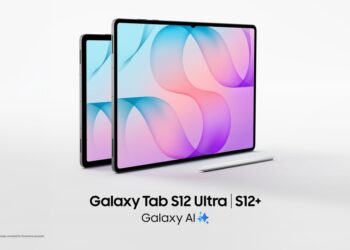
“…until it’s fixed, Bixby runs the risk of being just another personal assistant on the Galaxy S8 and any other device where it will be made available on.” That was my conclusion when I first encountered Bixby on the Samsung Galaxy S8 2 years ago.

In the mobile tech world, 2 years is a long time. It’s like forever. As such, the version of Bixby that I was interacting with 3 months ago on the Samsung Galaxy Note 9, seemed more mature even though it still had echoes of the earlier versions and was still pretty much a tolerable lame duck than the preceding versions. It got a few things right. Like, triggering it via voice worked most of the time and the results were accurate most of the time even though they tended to be more robotic than the reliable Google Assistant is.

While that is all good and I didn’t have much to complain about Bixby on the Galaxy Note 9, that is limited to how things are from a software standpoint. From a hardware perspective, I had so many bones to chew with Samsung over the dedicated button meant to trigger Bixby.

READ:  Bixby, the personal assistant on the Samsung Galaxy S8, is helpful, futuristic and lacking at the same time

Not only is it badly placed, which means there are so many times I pressed it when all I wanted to do was press another button above it (more so when taking screen grabs) it also can’t be mapped to something else. That is quite a bummer since for people like me, I find more use for the Google Assistant than Samsung’s own virtual assistant.

Now, going forward, all that is changing.

According to Samsung, all its flagship devices that have the Bixby button (Galaxy S8/S8+, Galaxy Note 8, Galaxy S9/S9+ and Galaxy Note 9) will receive an update that will allow users of the said devices to configure the button to do more than just activate Bixby when launched.

“Now, you can customize the button to launch Bixby with either a single or double press, and map the other option to launch your favourite app or Quick command.”

Known as Bixby Key Customization, the feature became public with the announcement of Samsung’s latest flagship smartphone, the Galaxy S10, as it is one of the headlining software features. Well, at least it is to all of us who never loved Samsung’s approach to this whole thing given that the likes of LG offer budget devices that have dedicated Google Assistant buttons and not their own weak take at a virtual assistant.

Bixby has been updated on the Galaxy S10 to bring more capabilities to Bixby Voice and Bixby Vision. Another feature, Bixby Routines, which makes use of machine learning to analyse one’s personal patterns and preferences based on how they use the apps on their device before recommending ways to automate certain tasks based on the insights it has gathered, has also been rolled out to the smart assistant.

Now, there won’t be much use for workarounds such as this and this.
READ:  Samsung Galaxy S10, S10+ and S10e up for pre-order in Kenya
Join our Telegram channel
Previous Post

Safaricom opens Samsung Galaxy S10 pre-orders

Next Post

Nokia 1 Plus specifications

Related Posts

Samsung Remains the Only Android OEM in Q3 2025’s Top-Selling Phones
News

Samsung Remains the Only Android OEM in Q3 2025’s Top-Selling Phones

December 10, 2025
Samsung’s New Galaxy Z TriFold Takes Direct Aim at Huawei’s Mate XT
News

Samsung’s New Galaxy Z TriFold Takes Direct Aim at Huawei’s Mate XT

December 2, 2025
Samsung at Risk of Losing Global Smartphone Crown to Major Rival – Report
News

Samsung at Risk of Losing Global Smartphone Crown to Major Rival – Report

November 27, 2025
Next Post
Nokia 1 Plus specifications

Nokia 1 Plus specifications

Leave a Reply Cancel reply

Your email address will not be published. Required fields are marked *

Subscribe to our newsletter

  • Trending
  • Comments
  • Latest
Google Pixel 10a Leak Indicates No Real Upgrades Coming

Google Pixel 10a Leak Indicates No Real Upgrades Coming

December 10, 2025
Samsung Remains the Only Android OEM in Q3 2025’s Top-Selling Phones

Samsung Remains the Only Android OEM in Q3 2025’s Top-Selling Phones

December 10, 2025
Tecno Spark 3 Pro-10

How to fix OTG connected pop-up error on Tecno phones

July 28, 2019
Kenya-Power

Kenya Power’s MyPower app gets a major upgrade

January 16, 2025
Google Pixel 10a Leak Indicates No Real Upgrades Coming

Google Pixel 10a Leak Indicates No Real Upgrades Coming

0
Samsung Remains the Only Android OEM in Q3 2025’s Top-Selling Phones

Samsung Remains the Only Android OEM in Q3 2025’s Top-Selling Phones

0
Android 16: A Complete Breakdown of the Newest QPR2 Update

Android 16: A Complete Breakdown of the Newest QPR2 Update

0
YouTube Just Dropped Its Own ‘Wrapped’ For Videos

YouTube Just Dropped Its Own ‘Wrapped’ For Videos

0
Google Pixel 10a Leak Indicates No Real Upgrades Coming

Google Pixel 10a Leak Indicates No Real Upgrades Coming

December 10, 2025
Samsung Remains the Only Android OEM in Q3 2025’s Top-Selling Phones

Samsung Remains the Only Android OEM in Q3 2025’s Top-Selling Phones

December 10, 2025
Android 16: A Complete Breakdown of the Newest QPR2 Update

Android 16: A Complete Breakdown of the Newest QPR2 Update

December 3, 2025
YouTube Just Dropped Its Own ‘Wrapped’ For Videos

YouTube Just Dropped Its Own ‘Wrapped’ For Videos

December 2, 2025
  • About
  • Advertise
  • Privacy Policy
  • Contact

© 2025 Android Kenya

No Result
View All Result

© 2025 Android Kenya


Loading Comments...