• About
  • Advertise
  • Privacy Policy
  • Contact
Android Kenya
  • Home
  • News
  • Apps
  • Gadgets
  • Reviews
  • Deals
  • How To
  • Knowledge Base
No Result
View All Result
  • Home
  • News
  • Apps
  • Gadgets
  • Reviews
  • Deals
  • How To
  • Knowledge Base
No Result
View All Result
Android Kenya
No Result
View All Result
Home News

Microsoft rolls out its own password autofill solution, baked into the Authenticator app on Android

Emmanuel Chenze by Emmanuel Chenze
February 6, 2021
in News
0
Microsoft rolls out its own password autofill solution, baked into the Authenticator app on Android
FacebookTwitterWhatsApp

You have to admit that the hustle of having to remember that complex password you created in a bid to stay safe online every other time you need it isn’t worth it. Which is why many of us have, over the years, turned to the many password managers available that offer, among other features, an autofill solution.

Now, Microsoft is throwing its hat in the ring with its own take on a password autofill solution.

On the Android platform, users who already use Microsoft’s Authenticator app, don’t have to do a thing as the feature is being added there and should be available shortly – if it hasn’t already – through an update. Those that don’t have the app only need to download and install it from the Play Store (see link below) and then sign in with their Microsoft account(s) – or sign up for one if they don’t have it.

When one moves to their desktop computing device, the same autofill feature is accessible via a Chrome extension. Of course, it goes without saying that there should be no need for such when using Microsoft’s own Edge browser on desktop.

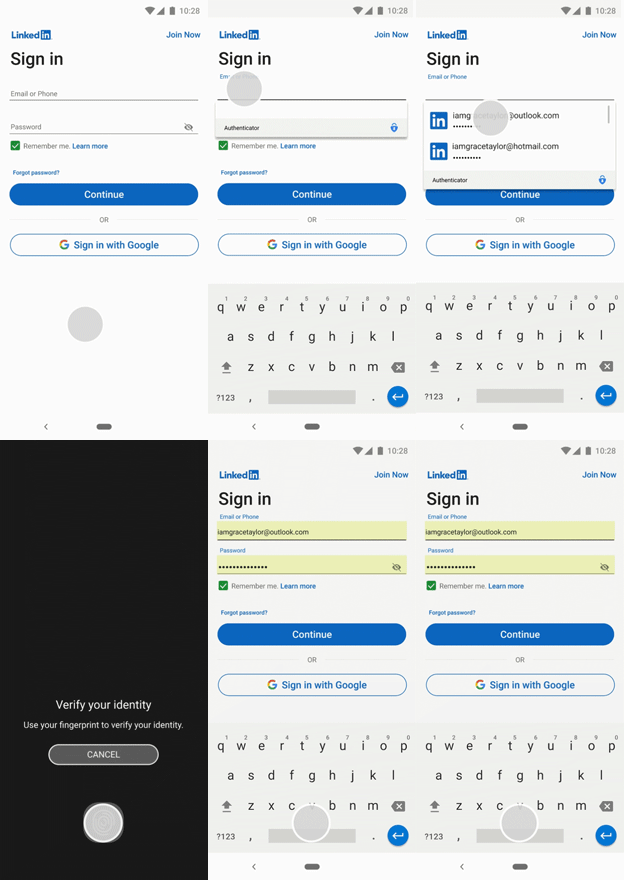
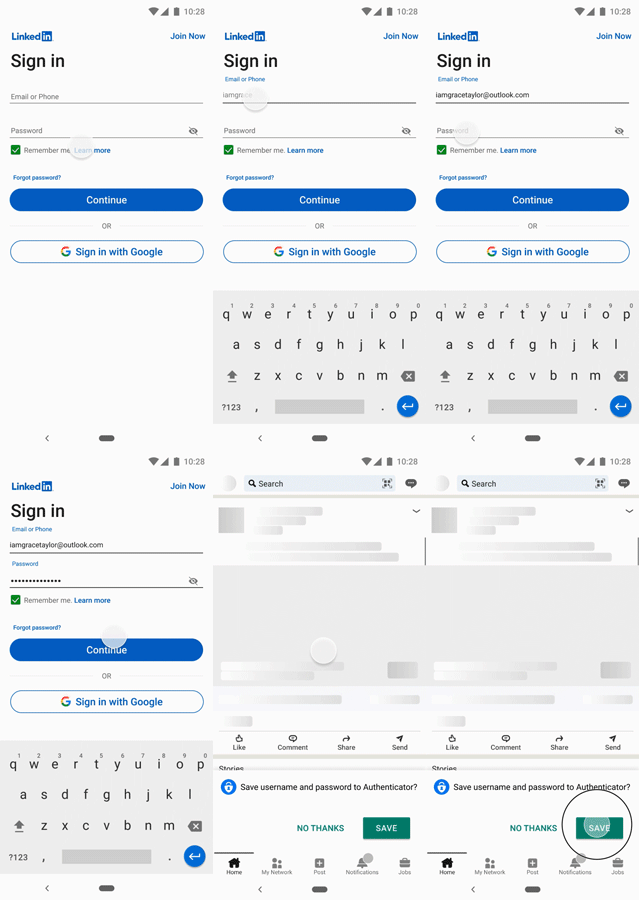
“Autofill stores your passwords under your Microsoft account. To get started with autofill on mobile, open the Microsoft Authenticator app, and then sign-in on the Passwords tab with your Microsoft account. If you have passwords saved under your Microsoft account on Microsoft Edge, they will sync to the Authenticator app.”

Here’s how that works:
READ:  Infinix unveils Limited Edition Sauti Sol Infinix Note 10 Pro

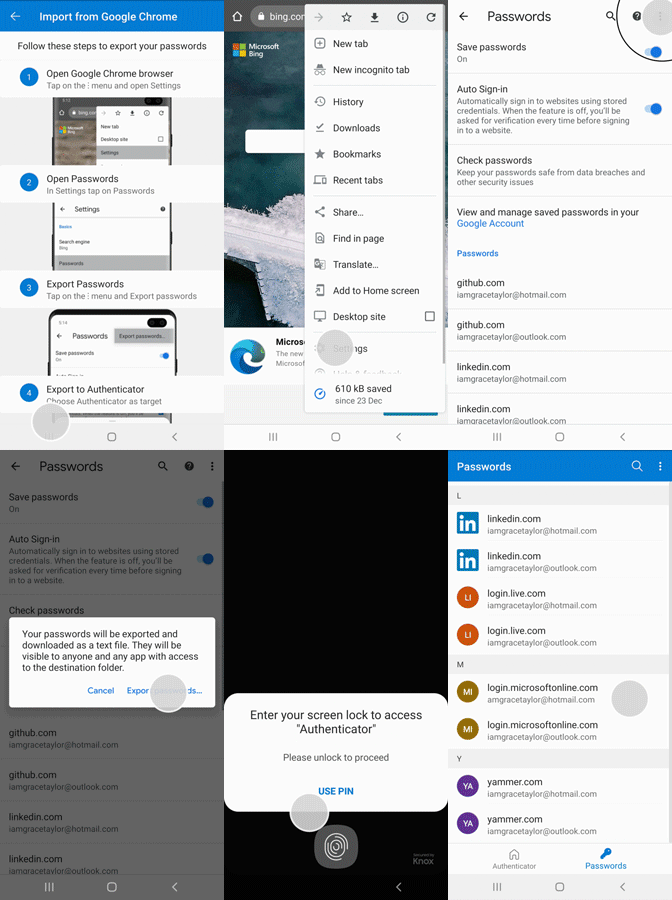
For those that already use other solutions, like the browser-based ones (for example, thanks to the Google Smart Lock feature on Android devices, passwords can be saved with Google and synced across devices, accessible via the Google Password Manager when on the desktop), Microsoft is also offering an easy way to import their already saved passwords so that they are ready to be auto-filled the next time they are needed.

Here’s how to do that:
 

Microsoft Authenticator
Download QR-Code
Microsoft Authenticator
Developer: Microsoft Corporation
Price: Free

Join our Telegram channel
Previous Post

Huawei Y7a up for pre-order

Next Post

Safaricom permanently doubling* Home Fibre bandwidth starting March 1

Related Posts

Link-to-Windows
Apps

Xiaomi wants their phones to work better with Windows PCs – and here’s how

January 16, 2025
Windows-Control-Panel
News

Microsoft confirms it’s killing Windows Control Panel sometime soon

September 19, 2024
Windows 11 will soon let you start Wi-Fi hotspot on your Samsung Galaxy
News

Windows users will soon be able to see their Android phone’s files in File Explorer

July 26, 2024
Next Post
Safaricom Home Fibre customers are getting free Showmax streaming this April

Safaricom permanently doubling* Home Fibre bandwidth starting March 1

Leave a Reply Cancel reply

Your email address will not be published. Required fields are marked *

Subscribe to our newsletter

  • Trending
  • Comments
  • Latest
Kenya-Power

Kenya Power’s MyPower app gets a major upgrade

January 16, 2025

Oppo A60 review: Rugged darling

June 10, 2024
Tecno Spark 3 Pro-10

How to fix OTG connected pop-up error on Tecno phones

July 28, 2019
Oppo Reno8 T review: High praise

Oppo Reno8 T review: High praise

February 28, 2023
Samsung Galaxy S26 series

Rumoured Samsung Galaxy S27 Pro Could Render the Plus Useless

0
BREAKING: Samsung Announces Galaxy S26 Series

Samsung Adds AirDrop Support to Select Galaxy Devices

0
Nothing Phone 4a Pro

Nothing Phone 4a Pro Breaks Cover With Its Most Striking Design Yet

0
WhatsApp Working on Premium Subscription Plan Called WhatsApp Plus

WhatsApp Working on Premium Subscription Plan Called WhatsApp Plus

0
Samsung Galaxy S26 series

Rumoured Samsung Galaxy S27 Pro Could Render the Plus Useless

April 6, 2026
BREAKING: Samsung Announces Galaxy S26 Series

Samsung Adds AirDrop Support to Select Galaxy Devices

March 23, 2026
Nothing Phone 4a Pro

Nothing Phone 4a Pro Breaks Cover With Its Most Striking Design Yet

March 5, 2026
WhatsApp Working on Premium Subscription Plan Called WhatsApp Plus

WhatsApp Working on Premium Subscription Plan Called WhatsApp Plus

March 5, 2026
  • About
  • Advertise
  • Privacy Policy
  • Contact

© 2025 Android Kenya

No Result
View All Result

© 2025 Android Kenya


Loading Comments...