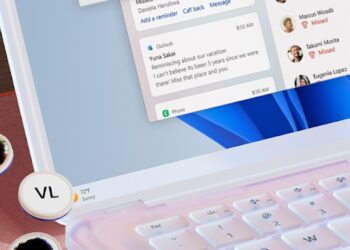
Microsoft is overhauling how your Windows PC will be interacting with your Android smartphone starting on April 1.
The tech giant is rebranding its Android Your Phone companion app to Phone Link, as well as introducing a host of new visual improvements to make the app function more intuitively on PC than before.
The radical tweak in design is aimed at making notifications more prominent when you are engrossed with work on your PC. The Phone Link app was launched slightly over three years ago as a simple way to link your Android phone to Windows and avoid picking up your device to check calls and notifications.
However, its previous name, “Your Phone”, had an old-school feel to it similar to, “This PC” or “My Computer” on Windows devices that just did not work well for an app in these modern times. The shift to Phone Link as well as introducing a revamped style that matches Windows 11 design cues does the app more justice.
With their aim of making notifications stand out better, the notification panel has been moved upfront, while the notifications tab is now pinned to the left-hand side panel. The dedicated section that features Messages, Photos, Apps, and Calls has then been moved into a navigation bar that is located at the very top of the Phone Link app.
Sticking to the Windows 11 design language, the rebranded Phone Link app also includes a colour palette and design that mirrors the new OS with redone controls, illustrations, and iconography.
The changes do not stop with the desktop app, as the Your Phone Companion app for Android is also getting a name change to Link to Windows. Understandably, both apps will share the same icon to prevent some users from thinking they are not working in tandem.
In terms of practicality when using the app, Phone Link has always worked best with Samsung Galaxy devices as well as the Surface Due Line-up. Samsung for instance could take advantage of accessing its phone’s apps on your Windows PC.
However, with Android apps hitting Windows 11 in the near future anyway, this advantage will obviously be lessened. You can also access your smartphone texts on PC using Google Messages if you do not need the other services offered by Phone Link.
Microsoft on the other hand is still determined to improve the Phone Link experience for more smartphone brands. Alongside the Phone Link revamp announcement, the company has also made the app available in China thanks to a partnership with Honor.
Thanks to this partnership, Phone Link will get better integration with the Honor Magic V, Magic 4 series, and the Magic 3 series. But still, beyond the aforementioned brands, the features are still limited, and having a phone that is not supported might leave feeling disappointed.
If you still want to give it a go, the Phone Link update is already live, and with the following Windows 11 update, it will bring the ability to enable the app by simply scanning a QR code during the initial setup.