• About
  • Advertise
  • Privacy Policy
  • Contact
Android Kenya
  • Home
  • News
  • Apps
  • Gadgets
  • Reviews
  • Deals
  • How To
  • Knowledge Base
No Result
View All Result
  • Home
  • News
  • Apps
  • Gadgets
  • Reviews
  • Deals
  • How To
  • Knowledge Base
No Result
View All Result
Android Kenya
No Result
View All Result
Home News

Google’s Gboard introduces split keyboard for large screen devices

Naftaly Kariuki by Naftaly Kariuki
July 15, 2022
in News
0
Google’s Gboard introduces split keyboard for large screen devices
FacebookTwitterWhatsApp

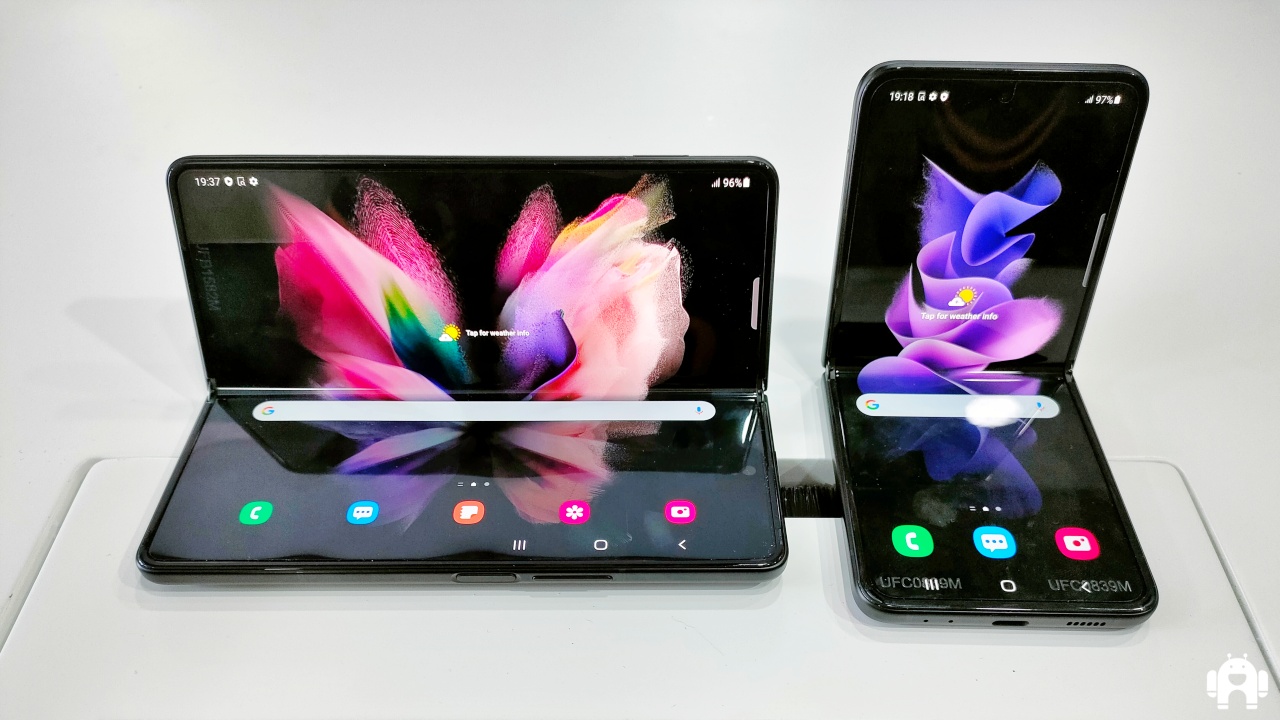
The big screen estate that comes with foldable devices is a double-edged sword, as it makes the regular keyboard quite tricky to use comfortably as you would on a standard size display.

Google seems to have taken notice of this, and they have rolled out an update that introduces a new split keyboard on the Gboard app. The update is aimed at making typing on big extended screens like that of the Samsung Galaxy Z Fold 3 more comfortable and ergonomic. The update is not restricted to Samsung devices, as it also works with the Microsoft Surface Duo 2.

The new feature makes the keyboard divide in half, pushing all the keys closer to the sides of the foldable phone, where your thumbs naturally rest when holding a big device.

It is important to note that the Z Fold devices had this kind of functionality inbuilt with Samsung’s keyboard software, but it is still a welcome addition as there are users who prefer Gboard’s typing interface and autocorrect features.

In order to try it on your foldable device, you first need to head over to the Play Store on your smartphone and then sign up for the beta. Google notes that beta version 11.9.04 will include the update, however, you might still need to wait for a short period before the tech giant turns on a server-side switch before you can see it on your app.

You will know you are ready to go when a split keyboard icon appears in the toolbar above your foldable’s on-screen keyboard. By touching this icon, the Gboard will split in half, and a symbol that can bring the two halves back together will take its place.

READ:  5 keyboard apps for Android you should be using

At the time of writing, it is not clear whether the update will make its way to other large-screen devices like tablets. However, extending the functionalities to more devices would make for a more natural progression, rather than restricting the feature to one particular type of device.

After all, there are third-party keyboards in the Play Store that already offer the spilt keyboard. Even the iPad has had the functionality for years at this point. We will give you a heads-up when Google rolls the update to other devices, which might be as soon as the beta period ends.

Join our Telegram channel
Previous Post

Google Keep now lets you drag and drop images to other apps

Next Post

Huawei introduces Xmage after partnership with Leica ends

Related Posts

Gboard now supports Luo, Kamba, Gusii, Giriama, Meru, and Teso languages
Apps

Google to introduce an AI text-to-image generator on Gboard

February 25, 2023
Samsung announces new range of Galaxy devices, available in Kenya with various add-on deals
News

Samsung announces new range of Galaxy devices, available in Kenya with various add-on deals

March 2, 2023
Samsung unveils new foldable smartphones and wearables, available in Kenya in September
News

Samsung to drop Z branding in its foldable lineup

August 9, 2022
Next Post
Huawei introduces Xmage after partnership with Leica ends

Huawei introduces Xmage after partnership with Leica ends

Leave a Reply Cancel reply

Your email address will not be published. Required fields are marked *

Subscribe to our newsletter

  • Trending
  • Comments
  • Latest
Android Users to Lose More Google Storage Under New Backup Policy

Android Users to Lose More Google Storage Under New Backup Policy

July 16, 2026
Xiaomi-Redmi-Note-13

Redmi Note 13 series bootloader unlock error claiming ‘system is being upgraded’ gets acknowledged

March 21, 2024
Tecno Spark 3 Pro-10

How to fix OTG connected pop-up error on Tecno phones

July 28, 2019
How to Check Your 2025 KCSE Results: Step-by-Step Guide and SMS Option

How to Check Your 2025 KCSE Results: Step-by-Step Guide and SMS Option

January 9, 2026
Google Wants Your Face to Become Your New Password

Google Wants Your Face to Become Your New Password

0
Samsung Unveils Galaxy Z Fold8 Ultra, Fold8 and Flip8 as Apple Prepares to Enter Foldable Market

Samsung Unveils Galaxy Z Fold8 Ultra, Fold8 and Flip8 as Apple Prepares to Enter Foldable Market

0
Android Users to Lose More Google Storage Under New Backup Policy

Android Users to Lose More Google Storage Under New Backup Policy

0
Samsung Drops Samsung Pass Updates for Older Android Devices

Samsung Drops Samsung Pass Updates for Older Android Devices

0
Google Wants Your Face to Become Your New Password

Google Wants Your Face to Become Your New Password

July 24, 2026
Samsung Unveils Galaxy Z Fold8 Ultra, Fold8 and Flip8 as Apple Prepares to Enter Foldable Market

Samsung Unveils Galaxy Z Fold8 Ultra, Fold8 and Flip8 as Apple Prepares to Enter Foldable Market

July 22, 2026
Android Users to Lose More Google Storage Under New Backup Policy

Android Users to Lose More Google Storage Under New Backup Policy

July 16, 2026
WhatsApp Working on Premium Subscription Plan Called WhatsApp Plus

WhatsApp Developing First-Party Backup That Fixes Its Biggest Flaw

July 14, 2026
  • About
  • Advertise
  • Privacy Policy
  • Contact

© 2025 Android Kenya

No Result
View All Result

© 2025 Android Kenya